How to Load, Save, and Audit .set Files in MT5 Strategy Tester
Inside MetaTrader 5 .set files: where Strategy Tester presets live, what the five || columns mean, why inputs silently reset, and how to diff vendor sets.
Loading an MT5 set file in Strategy Tester looks like a two-click chore until a backtest refuses to match a friend’s run — or worse, a vendor’s “low-risk” preset quietly leaves dynamic lot scaling switched on while displaying 0.01 in the fixed-lot row. Because MetaTrader 5 merges presets silently without warning you about missing, renamed, or inactive variables, treating a .set file as an opaque black box is an easy way to test the wrong configuration.
Under the hood, every .set file is just a short UTF-16 text document. Once you know where MetaTrader 5 stores them, what the five pipe-separated fields on each line mean, and how to diff two presets in ten seconds, you will never run an unverified input sheet again.
On this page9 sections
- Why MT5 Uses Two Different Preset Folders
- Inside an MT5 .set File: UTF-16 Encoding and the Five || Columns
- The Right Loading Order: Always Click “Defaults” First
- Four Silent Ways MT5 Drops or Misreads Your Presets
- What to Audit Inside a Vendor .set File Before Backtesting
- How to Diff Two .set Files Without UTF-16 Gibberish
- Moving a Tested .set File onto a Live or Demo Chart
- Where to Go Next
- FAQ
Why MT5 Uses Two Different Preset Folders
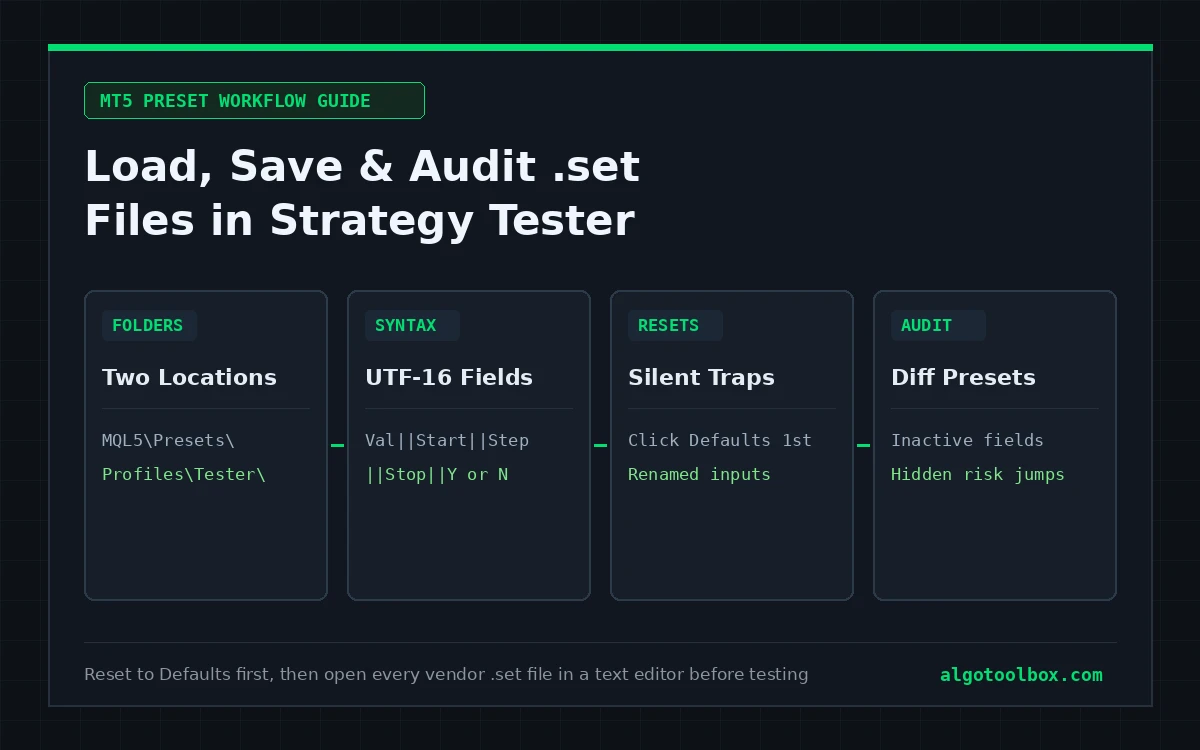
The first confusion new MetaTrader 5 users hit is saving a preset in one window and watching it fail to appear in the file picker of another. Inside your active terminal directory (File → Open Data Folder), MT5 splits parameter files across two separate paths:
| Where you click Load / Save | Default Data Folder path | What lives there |
|---|---|---|
| Live or Demo Chart (Right-click chart → Properties / Expert List → Inputs tab) | MQL5\Presets\ |
Single-value chart parameter files (Name=Value) meant for attaching EAs or indicators to live charts. |
| Strategy Tester (Ctrl+R → Inputs tab → Right-click → Load / Save) | MQL5\Profiles\Tester\ |
Five-column Strategy Tester parameter files (.set) alongside cached tester state files (.ini). |
Both dialogs can browse anywhere on your hard drive, so a .set saved from Strategy Tester loads fine on a live chart (MT5 simply reads the first value column and ignores the optimization columns). Just remember which directory each dialog opens by default so you do not accidentally load an older copy sitting in MQL5\Presets\ after updating the copy in MQL5\Profiles\Tester\.
Inside an MT5 .set File: UTF-16 Encoding and the Five || Columns
Open any Strategy Tester .set file in a modern code editor (VS Code, Notepad++, or Windows Notepad) and you will see plain human-readable text encoded in UTF-16 Little Endian (starting with the two-byte BOM FF FE). Lines beginning with a semicolon (;) are comments, followed by one key=value assignment per input variable declared in the EA:
; Example Strategy Tester preset header
; XAUUSD, M15, Every tick based on real ticks, $1,000, 2026-01-01 to 2026-10-31

InpRiskMode=1||0||1||2||N
InpFixedLot=0.01||0.01||0.01||0.10||N
InpStopLossPts=1000||500||250||3000||Y
InpMaxSpreadPts=300||300||10||500||N
Notice the five double-pipe (||) fields to the right of the equals sign when a file is saved from the Strategy Tester:
- Column 1 (
Value): the active parameter value used during a normal single backtest or live chart session (here,InpStopLossPts = 1000). - Column 2 (
Start): the starting value used only when Strategy Optimization is enabled (not necessarily the EA’s source-code default). - Column 3 (
Step): the increment added on each optimization pass (250). - Column 4 (
Stop): the upper bound where the optimization sweep ends (3000). - Column 5 (
YorN): whether that parameter is ticked for optimization (Y= active sweep variable;N= held fixed at Column 1).
One detail catches almost everyone reading raw .set files for the first time: enum dropdowns save as integers, not labels. In the MT5 UI, an input might display Combo Safe or BIG; inside the .set file, it writes Strategy=15 or Dashboard=2 (matching the underlying MQL5 enum value, as seen in our Gold Beaver MT5 and Ghost Scalper MT5 test setups). Booleans similarly write either true/false or 1/0 depending on how the developer typed the input.
The Right Loading Order: Always Click “Defaults” First
MetaTrader 5 does not wipe existing parameter values before applying a .set file — it performs a key-by-key overwrite. If you tested Preset A ten minutes ago (which changed 40 inputs) and you now load a partial vendor Preset B that only lists 12 inputs, the remaining 28 inputs silently keep Preset A’s leftover numbers instead of returning to factory defaults.
Follow this exact four-step habit every time you switch presets (it is part of our standard protocol on How We Test):
- In Strategy Tester, switch to the Inputs tab.
- Right-click anywhere in the table and click Defaults first so every single row returns to the EA binary’s compiled baseline.
- Right-click again, click Load, and select your target
.setfile. - Scan the Value column against the Default column — MT5 highlights modified rows so you can immediately see every parameter the preset actually touched.
Also remember what a .set file does not store: symbol, chart timeframe, date range, initial deposit, account leverage, execution delay, and tick modelling mode all live on the Strategy Tester’s Settings tab, never inside the .set file. When saving your own presets, add a semicolon comment line at the top of the file recording the exact symbol, timeframe, deposit, and modelling mode used so the file stays self-documenting months later.
Four Silent Ways MT5 Drops or Misreads Your Presets
- Renamed input variables after an EA update: MT5 matches
.setrows strictly by internal MQL5 variable identifier (for example,InpMaxSpread), not by the friendly display string shown in the UI. If an author updates an EA fromv1.0tov2.0and renamesMaxSpreadtoInpMaxSpread, loading yourv1.0.setfile silently ignores that line without popping up a single warning dialog. - Recompiling or switching EAs mid-session: selecting another Expert Advisor in the Settings dropdown and switching back resets unsaved manual tweaks in the Inputs grid. Save a named working preset (
Right-click → Save) before comparing different EAs. - Leftover
||Yflags when switching to Optimization: vendor.setfiles frequently ship with three or four parameters left ticked as||Yfrom the seller’s own optimization pass. If you turn on Slow or Genetic optimization expecting to sweep only your own chosen stop-loss row, any unchecked vendor||Yrows will multiply the pass count by hundreds of unwanted combinations. sinputand comment separator rows: variables declared with MQL5’ssinput(static input) modifier or read-only section headers (=== 01 Risk ===) appear in the table for organization, cannot be optimized, and do nothing if edited in text.
What to Audit Inside a Vendor .set File Before Backtesting
Commercial EA listings routinely ship three or four presets with reassuring names like Safe, Prop Firm, or Low Drawdown. Before clicking Start, inspect four specific parameter groups — each of these examples comes straight from published tests on our Test Reports:
| What to check in Inputs | Real example from our test bench | Why checking raw values matters |
|---|---|---|
| Inactive fixed-lot fields | Gold Beaver MT5 (Combo Safe): displays 0.01 in the fixed-lot field while Fixed mode = false and floating coefficient 11.6 are active. |
Lot sizes scaled up to 0.31 lots (1.36 gross lots across 7 positions) despite 0.01 sitting on screen. |
| Opaque risk preset integers | My AI Gold MT5: Conservative (riskk = 6), Prop (riskk = 7, max 1 trade), and Aggressive (riskk = 1). |
Changing one integer from 6 to 1 jumped risk to ~26% of balance per trade and drove max equity drawdown to 92.76%. |
| Point units vs dollar distance | Lizard EA MT5: Normal (3000), High (1000), and Armageddon (500) stop-loss presets on two-decimal XAUUSD. |
On a $0.01-point gold symbol, 3000 points equals $30, whereas on a three-decimal symbol the exact same 3000 means $3. |
| Zeroed-out prop drawdown guards | Both Gold Beaver and Lizard ship percentage daily-loss / max-DD guard inputs set to 0 (0.0) by default. |
Even when a separate Close on limit = true toggle is switched on, a threshold of 0.0 leaves the emergency brake disabled. |
How to Diff Two .set Files Without UTF-16 Gibberish
If you run standard command-line diff or git diff on two MT5 .set files, many tools treat them as binary files because of their UTF-16LE null bytes (0x00). You have two clean ways to compare presets line-by-line in seconds:
- In VS Code (zero setup): drag both
.setfiles into VS Code (which auto-detectsUTF-16 LEin the bottom-right status bar), right-click the first file in Explorer → Select for Compare, then right-click the second → Compare with Selected. - With a six-line Python check (ignores optimization columns and comments):
from pathlib import Path

def read_set(path):
    out = {}
    for line in Path(path).read_text(encoding="utf-16").splitlines():
        if line and not line.startswith(";") and "=" in line:
            k, v = line.split("=", 1)
            out[k.strip()] = v.split("||", 1)[0].strip()
    return out

a, b = read_set("Conservative.set"), read_set("Aggressive.set")
for k in sorted(set(a) | set(b)):
    if a.get(k) != b.get(k):
        print(f"{k}: {a.get(k)!r} -> {b.get(k)!r}")
That snippet strips out irrelevant ||Start||Step||Stop||N noise and prints only the active runtime parameters that actually differ between two presets.
Moving a Tested .set File onto a Live or Demo Chart
Once a preset passes backtesting (reviewed with how to read an MT5 Strategy Tester report and checked for tick coverage via MT5 modeling quality explained), double-check three items before loading that same .set onto a demo or live chart:
- Broker digit and cent-symbol scaling: if you tested on a standard two-decimal
XAUUSDfeed and deploy onto a cent symbol such asXAUUSDc(like our 15M Gold Scalper bench with its300-pointMax Spread to Opengate), checkDigitsin Ctrl+U → Specification so point-denominated stops, trailing steps, and spread filters still represent the same price distance. - Unique Magic Numbers per chart: a
.setfile carries its savedMagic Numberwith it. If you load the same.setonto bothEURUSDandXAUUSDcharts and the EA filters trades only by Magic Number without checking_Symbol, one chart can modify or close the other chart’s positions. - WebRequest-dependent filters wake up live: news calendars and external server filters cannot execute
WebRequest()inside the Strategy Tester, so they sit dormant during backtests even when switchedOnin the.setfile — verify whether you actually want them active (and whitelisted under Tools → Options → Expert Advisors) before enabling live AutoTrading.
Where to Go Next
- Once your preset runs, audit the output in the right sequence with how to read an MT5 Strategy Tester report, line by line.
- Verify whether your broker actually supplied real tick data during that preset run in MT5 modeling quality explained: real ticks vs OHLC.
- Installing open-source indicators or EAs alongside their preset folders? See how to install a custom MT5 indicator from GitHub and our full bench protocol on How We Test.
FAQ
Does an MT5 .set file save the timeframe, symbol, and initial deposit?
No. A .set file stores only the Expert Advisor’s or indicator’s own input variables. Symbol, timeframe, date window, deposit, leverage, execution latency, and tick modelling mode must be configured separately on the Strategy Tester Settings tab (or saved as a full Tester .ini configuration).
Can I use a MetaTrader 4 .set file inside MetaTrader 5?
Only if the MT4 and MT5 versions of that EA use the exact same internal input variable names and enum numbering. MT4 typically saves .set files in ANSI/ASCII encoding while MT5 uses UTF-16LE, though MT5 can import ASCII key-value pairs as long as the variable identifiers match verbatim.
Why did loading a .set file leave half my inputs unchanged?
Either the .set file was saved from an older version of the EA whose input variable names have since changed, or it is a partial preset that intentionally omits certain rows. Always right-click → Defaults before clicking Load, then check which rows turned highlighted.
What does the second number after || mean in a Strategy Tester .set file?
It is the Optimization Start parameter — not the EA’s compiled default value. The five pipe-separated fields are ActiveValue||OptStart||OptStep||OptStop||OptimizeFlag(Y/N). During a normal non-optimization backtest, MetaTrader 5 reads only the first value before the first ||.
Why does my text editor show spaces or null characters between every letter of a .set file?
MetaTrader 5 writes .set files in UTF-16 Little Endian (FF FE byte-order mark), which uses two bytes per basic Latin character. Reopen the file with encoding set to UTF-16 LE (automatic in VS Code and Notepad) so every line renders cleanly.
Risk & Transparency Notice: All indicators, scripts, and backtest results on AlgoToolbox are for educational and testing purposes only. Trading Forex, CFDs, and cryptocurrencies carries significant financial risk. Past performance does not guarantee future results. Read our full Risk Disclaimer.