Gold Breakout 15M MT5 Port
We ported a defined overnight gold breakout to MT5: dual stop entries, no take-profit and a 20:00 exit. The ten-month test returned $1,305.34 at 0.01 lot, with 22.35% equity drawdown.
Gold Breakout 15M EA is our free MT5 port of an overnight gold breakout strategy: mark the range, wait for either edge to break, and close by evening.
Last month I walked around the bottom of Jatiluhur, the big reservoir next to Purwakarta, our town in West Java. Where I walked, the water had retreated to a narrow stream winding through the basin, leaving the lake bed dry and exposed. Everyone here was waiting for the season to break. Gold Breakout 15M EA has a similarly simple job: wait for the range to break without choosing the direction in advance.
On this page9 sections
Test Bench
| Specification | Our configuration |
|---|---|
| Platform | MetaTrader 5 |
| Tool type | Expert Advisor |
| Version tested | 1.01 |
| Symbol / timeframe | XAUUSD M15 |
| Test period | 2026.01.01–2026.11.01 |
| Data / tick mode | Real-tick mode requested; 100% History Quality reported; accepted real-tick coverage not independently established. Zero configured delay; optimization disabled; no forward segment. |
| Account & spread | Exness-MT5Real7; USD 1,000; leverage 1:500; fixed 0.01 lot; historical tick spread; guard and spread filter off |
One range, one direction, one deadline
We adapted the Gold Breakout 15M Strategy by WillyAlgoTrader, published open-source on TradingView. The EA marks the overnight range and sets a stop order on each edge. The first breakout chooses the direction; the scheduled 20:00 close finishes the day. One range, one direction, one deadline.
Our ten-month XAUUSD backtest returned $1,305.34 net profit from a $1,000 deposit at 0.01 lot, with a 22.35% relative equity drawdown along the way. We’re a little proud of this port: the rules are straightforward, and the revised code reproduced the earlier headline results. That’s a useful development check, not a promise about the next ten months.
The default trading day uses broker-server time:
- 00:00–07:00: collect the high and low of the overnight range.
- From 07:00: place a buy stop at the high and a sell stop at the low.
- After an entry: cancel the opposite pending order. The intended limit is one trade per day.
- Manage the exit: keep the stop-loss in place and close any remaining position at the first eligible tick at or after 20:00.
The default stop is 1% of the entry price. An alternative uses the opposite range boundary. Neither mode sets a take-profit: the position gets time to develop, but not permission to stay open indefinitely.
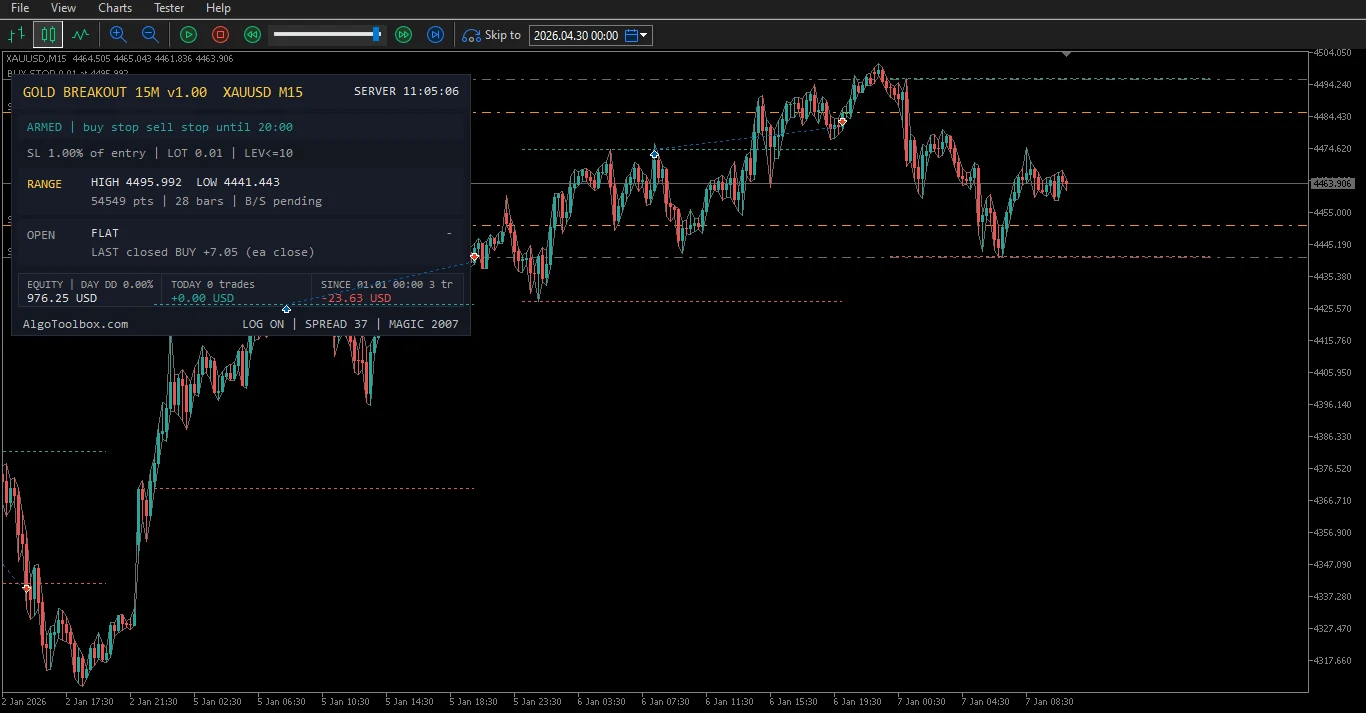
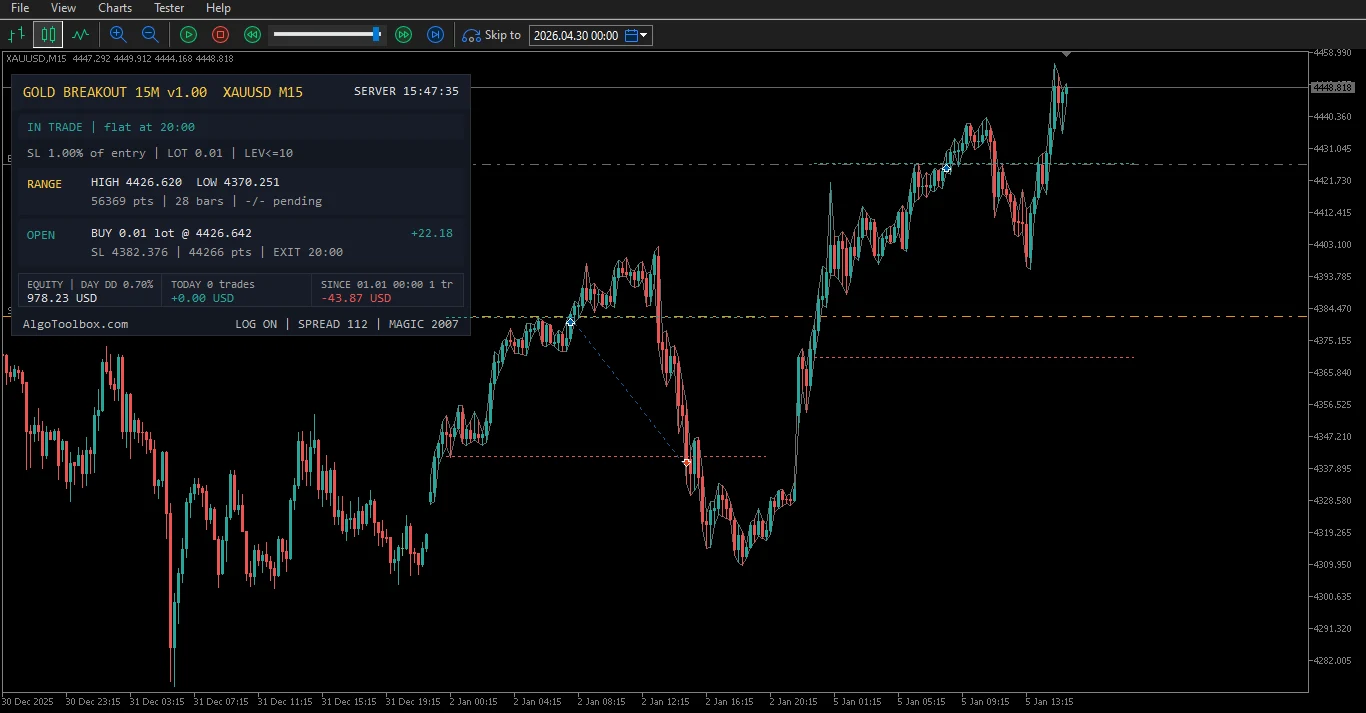
A normal seven-hour range contains 28 M15 bars. Read the panel before the candles: BUILDING RANGE, ARMED, IN TRADE and DONE tell you which part of the day the EA is handling.
Ten months: profitable, but not a smooth ride
We tested XAUUSD M15 from January through October 2026, with a November 1 end boundary on Exness-MT5Real7. The account started with $1,000 USD, leverage 1:500 and fixed 0.01-lot sizing.
The published setup records a real-tick modeling request and 100% History Quality. That quality field alone doesn’t establish accepted real-tick coverage; the Journal is needed to check for rejection or generated-tick substitution. Daily guard and spread filter were off. Execution used zero latency, with optimization disabled and no forward segment. These are historical backtest results, not live returns.
| Measure | Result |
|---|---|
| Net profit | $1,305.34 |
| Ending balance, initial deposit plus net profit | $2,305.34 |
| Profit factor | 1.46 |
| Trades / profitable trades | 201 / 106 (52.74%) |
| Gross profit / gross loss | $4,134.66 / −$2,829.32 |
| Average winning / losing trade | $39.01 / −$29.70 |
| Maximum relative balance drawdown | 12.45% ($174.42) |
| Maximum relative equity drawdown | 22.35% ($351.47) |
| Largest losing trade | −$54.12 |
The re-run with revised terminal-handling code reproduced the earlier headline results exactly: profit, profit factor, trade count, win rate and both relative drawdowns. We kept the trading rules fixed while improving the code around them.
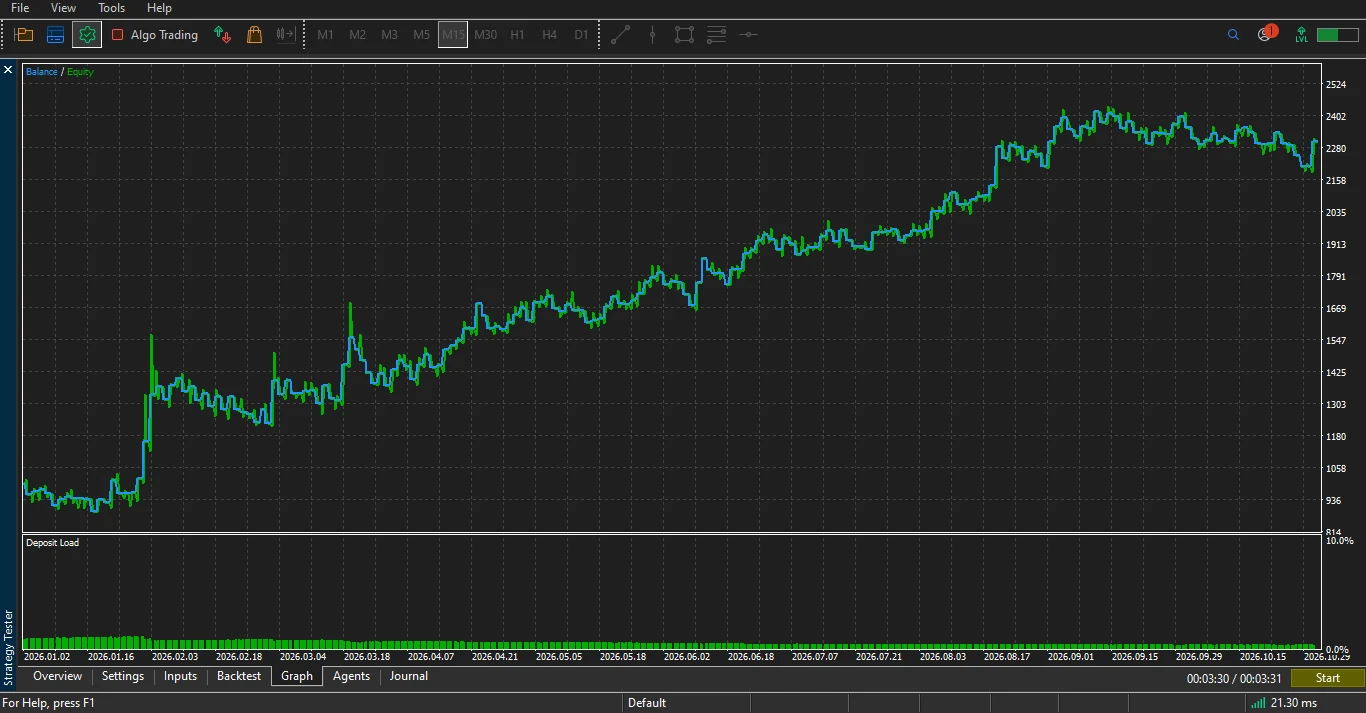
The largest winner paid $179.23 against a largest loss of $54.12—more than three to one in this sample. Across all trades, the averages were closer: $39.01 per winner and $29.70 per loser, alongside a 52.74% win rate. The biggest winner makes a good story; the averages explain more of the result.
That fits the no-take-profit idea: give a favorable move the rest of the session rather than cutting it at a fixed target. The stop is there to limit downside, although gaps and slippage can make the realized loss larger than planned.
The tester also lists $210.05 (8.68%) as maximal monetary balance drawdown. That belongs to a different drawdown event from the maximum relative balance decline. For a percentage comparison, use 12.45% balance versus 22.35% equity. Comparing only 8.68% with 22.35% exaggerates the gap between the relative metrics.
Equity drawdown is the more relevant historical exposure check here, but it cannot set a future risk budget by itself. A position can give back floating profit or go underwater before its exit; closed trades don’t tell the whole story. The $351.47 decline is measured from its relevant equity peak, not simply divided by the original $1,000 deposit.
Our MT5 testing framework explains the broader approach to reading these runs.
A 1.46 profit factor is encouraging for this sample, but leaves a limited cushion against worse fills or a different market regime. Even verified real-tick coverage wouldn’t challenge live delay under zero-latency execution. Ten months on one broker is a starting result, not a robustness verdict.
Start with the clock and lot size
Installation and first setup
Copy the EA’s .mq5 file into MQL5/Experts through MT5’s File → Open Data Folder menu. Compile it in MetaEditor, refresh Navigator and attach it to your gold M15 chart. Start in the Strategy Tester or on demo before enabling live orders.
- Open your broker’s gold symbol on M15. Check contract size, minimum lot and volume step. A symbol suffix is fine; assuming every gold contract is equal isn’t.
- Check server time. Defaults mean midnight to 07:00 on the broker clock, then a 20:00 exit. Another server timezone changes the candles defining the range.
- Keep the core defaults for your first comparison. Use the percentage stop and documented session before experimenting with range-edge stops.
- Choose exposure deliberately. Fixed 0.01 lot reproduces this test’s sizing only on matching contract specifications. Compare the dollar stop risk with your balance on demo first.
- Keep MT5 running with Algo Trading enabled. Accepted pending orders and attached stops reside with the broker. Opposite-order cancellation, the timed exit and the equity guard depend on the EA operating.
A 1% price stop is not 1% account risk. At a hypothetical gold entry of 4400, a 1% stop is 44 price units away. The money at risk then depends on volume and contract value. Risk-percent mode estimates loss with OrderCalcProfit and rounds volume down. If the size falls below the broker minimum, it skips that side instead of rounding risk up.
We wouldn’t turn this run into a universal “$3,000 per 0.01 lot” rule. Even $351.47 divided by a 10% budget gives $3,514.70—and that only scales an observed monetary decline against a chosen capital budget. A different starting balance, leverage cap or future price path can change the result. Cent-account labels don’t remove the need to check contract specifications.
Our take: keep the rule simple, respect the exposure
The attraction is the lack of prediction. The EA waits on both sides and lets the first breakout choose. The time exit gives the trade a boundary: give it the session, then finish the day. We aren’t trying to turn an overnight breakout into a different machine with another round of filters. The bounded job is the point.
The equity-versus-balance gap is the uncomfortable part. A profitable ten months doesn’t make a 22.35% equity drawdown comfortable. Use this build to test the original idea on demo, with exposure judged from floating risk rather than the neatness of closed trades.
It suits readers who want a transparent session EA and can keep a terminal running. It doesn’t suit expectations of unattended operation without oversight, identical TradingView fills or verified prop-firm enforcement.
Back at Jatiluhur, we’re waiting for the water to return. On the chart, at least, we can put a rule around the waiting: mark both edges, let the break choose, and finish by evening.
MT5 implementation and input reference
What changed in our MT5 port
The core range-breakout rules remain, but the platforms don’t execute identically. MT5 places its pending orders once after the range is ready rather than refreshing planned size every bar. If price is already beyond an edge, it can submit a market entry. The percentage stop is reanchored on the reported fill rather than waiting for the entry candle’s close.
Opposite-order cancellation runs when the entry deal is reported. This is not atomic broker-side OCO: both orders can fill before cancellation completes. On hedging accounts, the duplicate handler keeps the earlier position and attempts to close the other, with tick-based fallback. On netting accounts, an opposite fill can reduce or close exposure instead. The EA refuses to arm against a foreign position on the symbol in netting mode.
Inputs and defaults
| Input group | Default / practical meaning |
|---|---|
| Session | Start 0, end 7, close 20; whole broker-server hours. |
| Stop mode | SL_PCT, 1.0% of entry; SL_RANGE uses the opposite edge. |
| Lot mode | Fixed-lot mode, 0.01; risk-percent mode uses the equity-risk input, default 1%. |
| Notional leverage cap | 10; can reduce calculated volume. This differs from the account’s 1:500 margin leverage. |
| Daily equity guard | Off; threshold 4% when enabled. |
| Maximum spread | 0 disables filtering. A positive value delays placement while spread exceeds the limit. |
| Deviation | 20 points for applicable market requests; not a universal bound on the fill price. |
| Magic / comment | Source default 2007 / GB15. The new regression report uses magic 20071. |
| Display and logging | Panel and CSV on; popup and push off. Panel position X=8, Y=22. |
Version 1.01 rebuilds the daily trading lock from entry history since server midnight. It retries guard cleanup until its positions and pending orders are gone, resolves position identifiers to current tickets, and includes entry-side commission in panel totals. The source accepts supported hour-dividing timeframes through H1; M15 is the setup tested here.
Limitations and when to turn it off
The optional guard measures account-wide equity but closes only this EA’s matching symbol/magic exposure. Other trades can trigger it while remaining outside its cleanup. The saved peak is periodic, and guard-state keys aren’t account-specific. Don’t rely on continuity across account switches in one terminal. These are operating limits, not verified prop-firm loss-limit enforcement.
Future maintenance can isolate guard storage by account, save its latest peak on normal shutdown, and handle unusual volume steps such as 0.25 more reliably. The tested 0.01 step and guard-off setup don’t depend on those improvements.
CSV logs go to Terminal\Common\Files\GB15_<symbol>_<magic>.csv. MT5 alerts, push notifications and the panel replace the chart-script webhook templates and display extras.
Source, Licence and Distribution
- Rights
- Open source
- MT5 port by
- Eko Martha Kusumah (AlgoToolbox)
- Original author
- WillyAlgoTrader
- Original work
- Gold Breakout 15M Strategy [WillyAlgoTrader]
- Licence
- MPL-2.0
- Version tested
- 1.01
- Tool type
- Expert Advisor
Attribution. Gold Breakout 15M Strategy [WillyAlgoTrader] by , licensed under MPL-2.0. MT5 port by Eko Martha Kusumah: rewritten and tested in MQL5, published on AlgoToolbox. MT5 port source code on GitHub.
Frequently asked questions
Does the Gold Breakout 15M EA have a take-profit?
No. The intended exits are the stop-loss or configured close hour, plus optional guard cleanup when enabled. The percentage stop is fixed after its fill-based adjustment. It doesn’t trail, and there’s no profit target to tune.
Can I use my local time for the session?
Inputs use broker-server time. Translate your intended session to that clock, and check what happens when the broker changes its daylight-saving offset.
Why might risk-percent mode place no order?
The risk budget may produce volume below the symbol minimum. The leverage cap can also reduce it below that minimum. Check the CSV reason rather than increasing risk just to force an entry.
Will it match TradingView trade for trade?
Don’t expect that. Price history, spread, broker clocks, order processing and stop-adjustment timing can differ, even with the core trading rules preserved.
Should I enable the 4% guard to reproduce these results?
No. The guard was off in this backtest. Enabling it changes when positions may close and prevents further entries for that server day after a trigger.
Find our other adaptations and original tools in Our Builds.
Where the port comes from
Original strategy: Gold Breakout 15M Strategy [WillyAlgoTrader], published as an open-source Pine Script v6 strategy. MT5 adaptation: AlgoToolbox, v1.01, distributed under MPL-2.0. The port retains the range-breakout, stop and scheduled-exit idea while adapting order handling and terminal recovery to MT5. The original author hasn’t reviewed or endorsed this port.
Risk & Transparency Notice: All indicators, Expert Advisors, and Strategy Tester runs on AlgoToolbox are for educational and evaluation purposes only. Trading Forex and CFDs carries substantial financial risk, and backtest results do not guarantee live performance. Read our full Risk Disclaimer.