Scalping Robot Pro MT5 Review
Scalping Robot Pro MT5 review: five backtests on XAUUSD M1, three windows, untouched defaults. Every run lost about 90% in days, and no run used real ticks.
This Scalping Robot Pro MT5 review tests MQL TOOLS’ $1,599 gold scalper in the MetaTrader 5 Strategy Tester. The EA trades XAUUSD from the M1 chart with pending stop orders, a fixed 0.01 lot, a 50-point spread cap, a 90-minute news block and an AI filter fed from the developer’s server.
We ran version 7.1 from the Market demo on a raw-spread account, at the developer’s own recipe, across three windows: June 2026, full-year 2025 and January 2021. All five runs lost about 90% of the $1,000 deposit within days. And although two runs requested real ticks, the tester’s log shows generated ticks did the work.
Test Bench
| Specification | Our configuration |
|---|---|
| Platform | MetaTrader 5 |
| Tool type | Expert Advisor |
| Version tested | 7.1 |
| Symbol / timeframe | XAUUSD M1 |
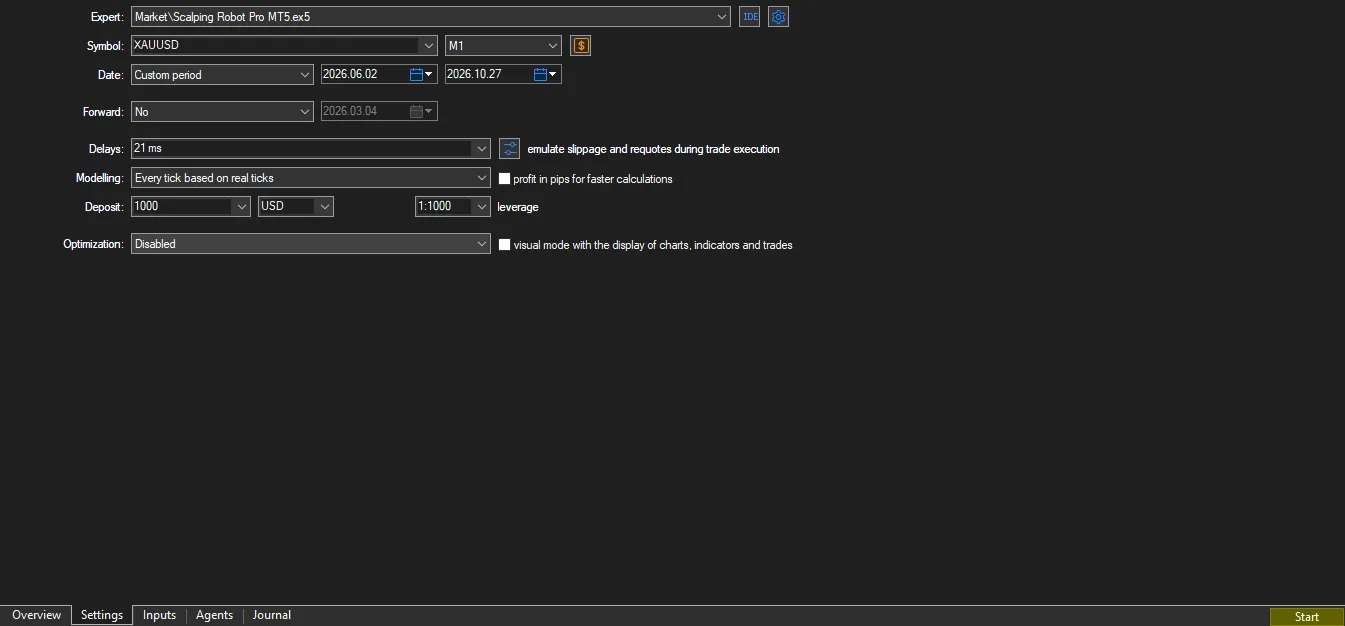
| Test period | 2026.06.02 – 2026.10.27 |
| Data / tick mode | Every tick based on real ticks" requested; the Journal discarded all 144,033 minutes — generated ticks used |
| Account & spread | Exness Raw Spread (MT5Real7), modeled 2-point spread, $1,000 deposit, 1:1000 leverage |
| Copy tested | Free demo (MQL5 Market), Strategy Tester |
What Scalping Robot Pro Is and What the Listing Promises
Scalping Robot Pro is a fully automated gold Expert Advisor. The official MQL5 Market listing describes an M1 scalper that enters with pending orders near recent extremes and manages each position with adaptive stops, targets and a trailing stop. Protection is the theme of the copy: a spread cap, candle-size and volatility filters, a tick-flow filter, session and holiday controls, and a non-farm-payroll option.
Two headline features sit outside the terminal. A news filter pauses trading 90 minutes before and after high-impact USD and EUR events, and an “AI Geopolitical Filter” runs on the developer’s server, which the listing says monitors social media and can pause trading for an hour, two hours or the rest of the day. Both features need web requests, so neither can operate inside the Strategy Tester.
The listing says the EA works with any MT5 broker, requires at least $1,000 and leverage from 1:10 to 1:2000, and gives its own test recipe: a $1,000 deposit, a custom date range, XAUUSD on M1 and “Every Tick Normal” modeling. On 28 October 2026 the price was $1,599 to buy or $1,099 to rent for a year, with 19,102 demo downloads. The product was published on 2 June 2026 and its version history shows seven releases since then.
We tested version 7.1 (21 October 2026), which the notes describe as a corrections release. Two details in the copy do not match: the body still says version 7.0, and a price deadline appears as both 25 and 28 October.
How It Trades in the Tester
This section describes what the order and deal lists record, not the code, which we cannot see. All five runs used identical inputs: the defaults, untouched. In the June 2026 reference run the EA placed 2,000 pending stop orders in four trading days, about 500 per day; 797 filled and 1,203 were canceled unfilled. This is genuinely fast scalping: the average position lived two and a half minutes.
Entry
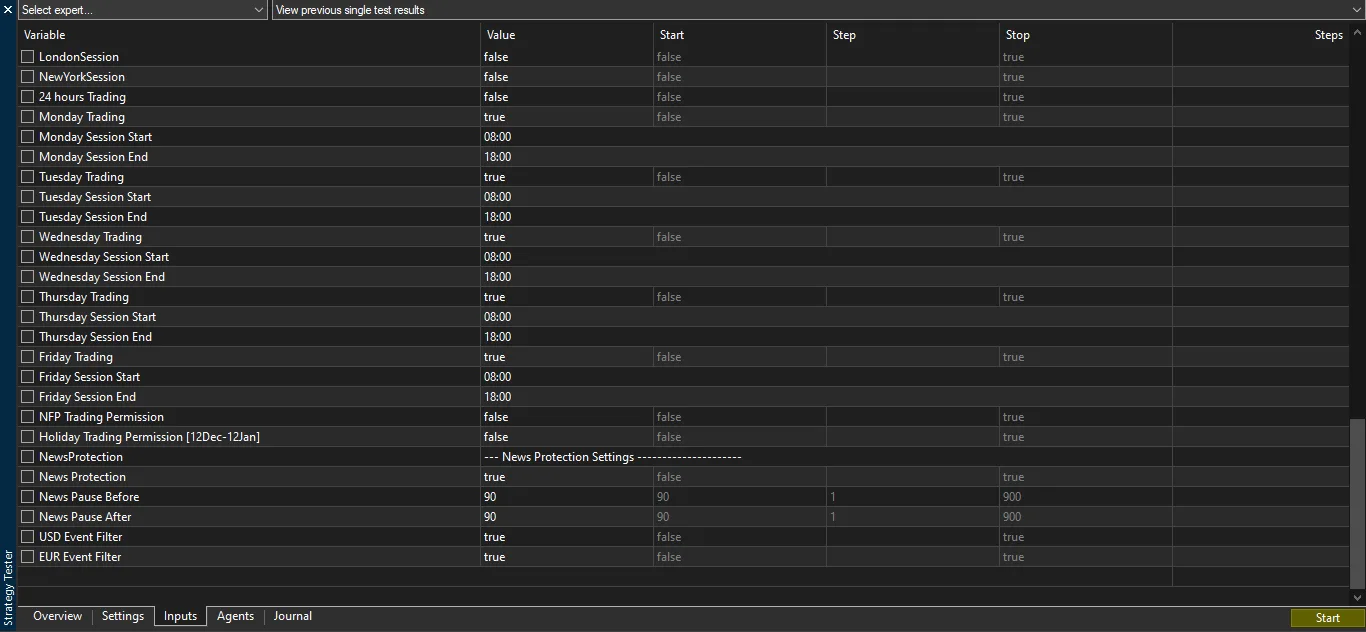
Every entry came from a buy-stop or sell-stop order placed 40 points from the current price (the EntryDistance input), never from a market order. Orders appear in small same-direction ladders: at the June run’s open, three sell stops were placed within 62 seconds as price climbed. Entries ran between 08:00 and 17:59 server time, Monday to Friday, matching the default session inputs.
Exit
Stop-loss and take-profit inputs ship at zero, so exits are computed internally. In the June run, 453 of 797 positions ended at a broker stop (labeled “sl” in the deal list), and the rest were closed at market by the EA’s own logic; no exit was labeled take-profit. Positions never aged: the report’s maximal holding time was 19 minutes 24 seconds, and an input named SAR (stop and reverse) is on.
Position management
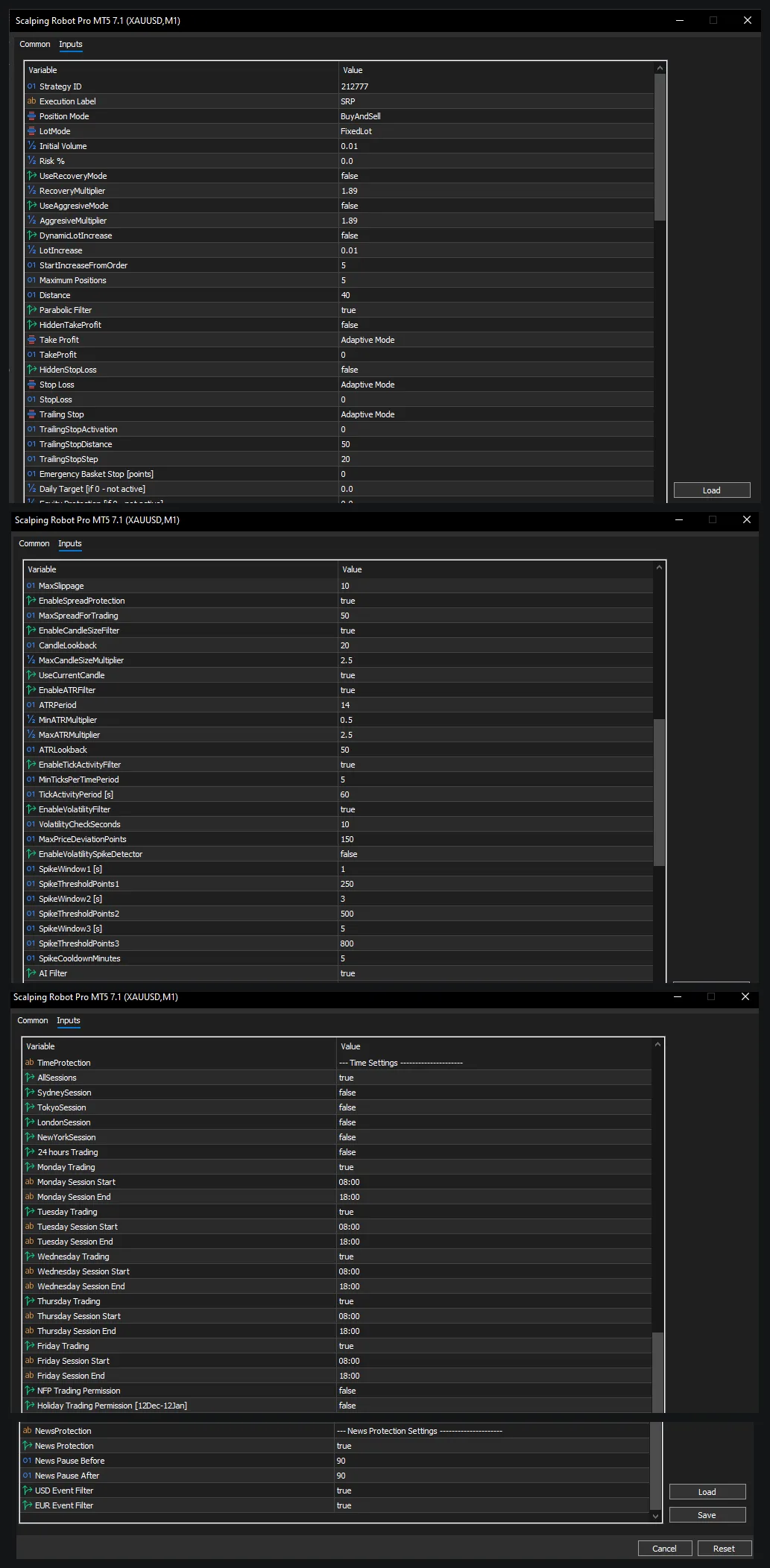
The default lot is fixed at 0.01 with martingale-style recovery off (a recovery multiplier of 1.89 exists as an input, disabled). Up to five positions can be open at once, and five were. The daily-profit and max-loss guards sit at zero — off. Spread protection was on at 50 points, but the modeled spread never reached it. The news and AI filters were on, yet the Journal shows no line that any of them ever acted.
Our Test Setup
| Input | Default | Our value | Why |
|---|---|---|---|
| Lot mode / size | FixedLot, 0.01 | Unchanged | The developer’s recipe: only set the lot size; 0.01 is the default |
| Recovery (martingale) | Off, multiplier 1.89 | Unchanged | Available but disabled by default |
| Max orders | 5 | Unchanged | Caps simultaneous positions |
| Stop-loss / take-profit | 0 (adaptive) | Unchanged | Computed internally; no fixed distances are set |
| Spread cap | On, 50 points | Unchanged | This is the EA’s own entry filter, not the tester’s spread |
| News filter | On, 90 min, USD + EUR | Unchanged | The calendar feed cannot load in the Strategy Tester |
| AI Geopolitical Filter | On | Unchanged | Runs on the developer’s server; unreachable from the tester |
| Equity / daily-loss guards | 0 (off) | Unchanged | No automatic shutdown level was set |
Disclosure: the broker link below is an affiliate link; AlgoToolbox may earn a commission at no cost to you. It does not affect our test results.
Runs 1 and 2 covered 2 June to 27 October 2026; Run 3 covered full-year 2025. Two earlier runs from our first session covered January 2021. All ran on the Exness-MT5Real7 server (terminal build 6230) on an Exness raw-spread account, with a $1,000 deposit, 1:1000 leverage, XAUUSD M1 and a 21-millisecond latency simulation. Run 1 and Run 3 requested “Every tick based on real ticks”; Run 2 and the second January run used plain “Every tick”. Our bench rules are on the how we test page.
One finding shaped this whole report. The tester’s Journal records that in Run 1 every single minute of real ticks — 144,033 minutes — was discarded for not matching the M1 bars, and generated ticks were used instead. Run 3 shows the same for 351,814 of 351,819 minutes, and the server notes that its real-tick history starts in January 2022, after both January 2021 runs. So no run in this test actually traded real ticks, whatever the report headers say.
Backtest Results: Reading the Data
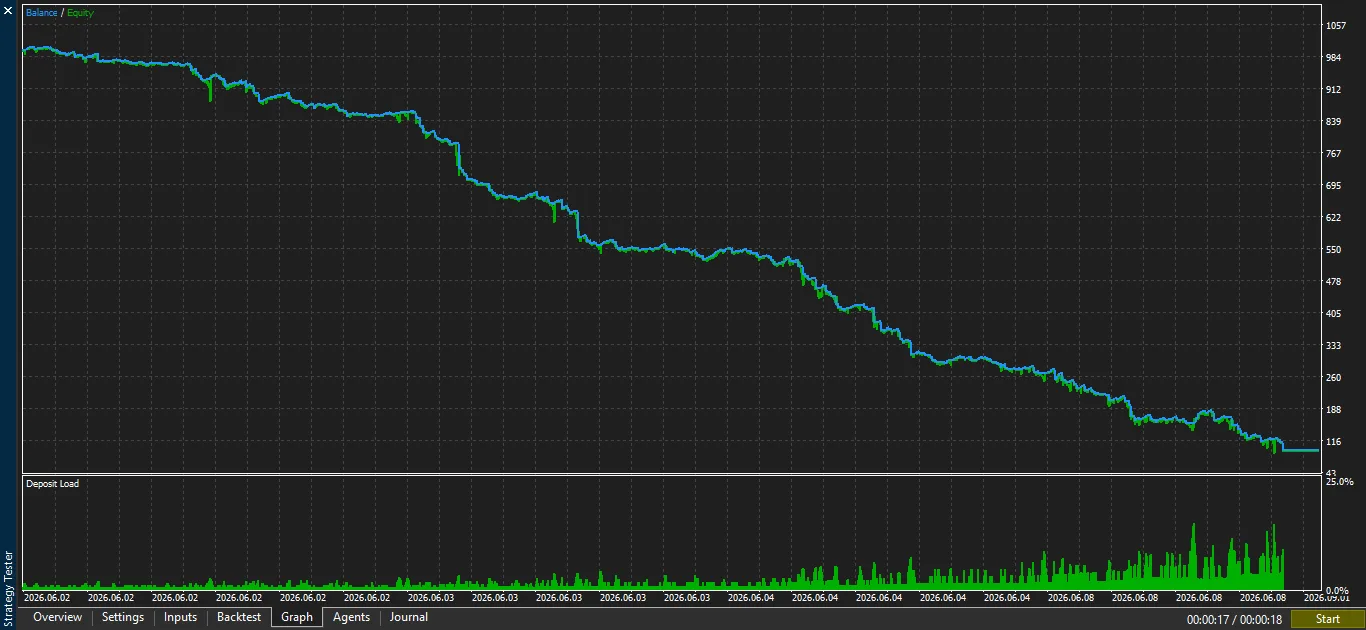
We treat Run 1 (June 2026, real-tick request, default inputs) as the reference, because it is the developer’s own recipe on the newest version. It ended at $94.89. The curve is a near-uninterrupted decline from the first trade: $1,000 to about $550 by the end of day two, then to $116 by the market close on 8 June. The largest single loss was $18.64; the account lost a little money, hundreds of times, fast.
After the balance fell below what 0.01 lots require, the EA did not stop on its own. From 8 June until the end of the test in October it kept sending orders and the Journal logged “Not enough money” refusals 88,725 times. The equity guards that would have shut it down early existed as inputs but were off, as shipped.
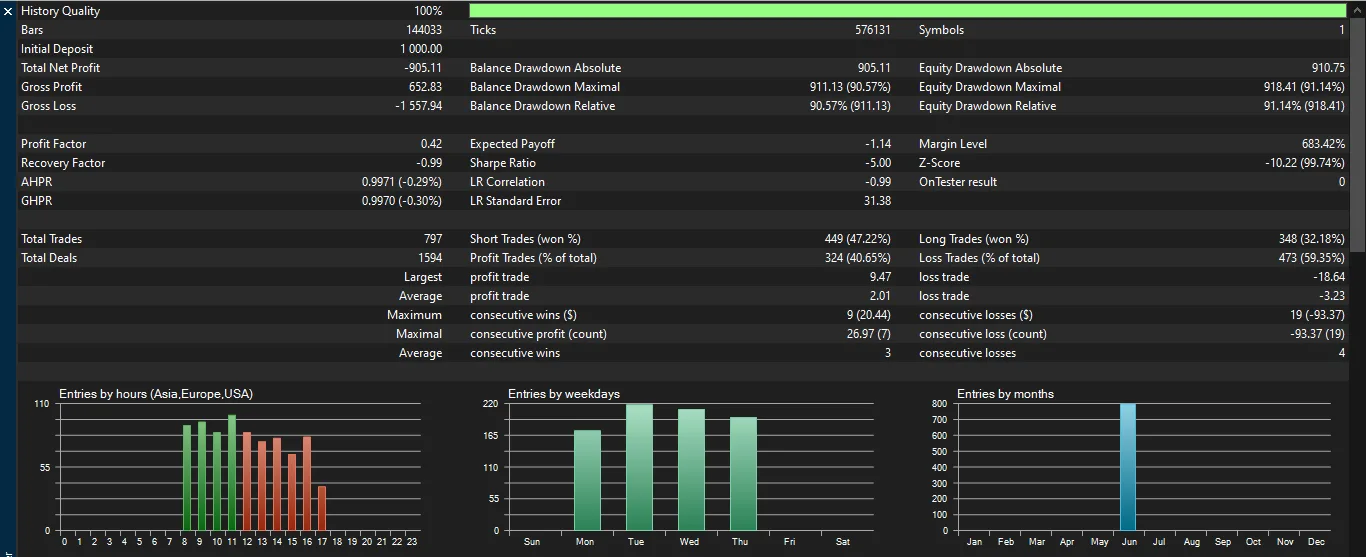
| Metric | Result | Source | What It Tells You |
|---|---|---|---|
| Total net profit | −$905.11 on $1,000 | Run 1 report (Figure 4) | Final balance $94.89: nearly the whole deposit gone |
| Profit factor | 0.42 | Run 1 report (Figure 4) | Gross profit $652.83 against gross loss $1,557.94 |
| Trades and win rate | 797 trades, 40.65% won | Run 1 report (Figure 4) | Average win $2.01 vs average loss $3.23 |
| Max drawdown | 91.14% of equity ($918.41) | Run 1 report (Figure 4) | Almost no recovery phase at any point |
| Active trading span | Four trading days | Run 1 deal list | Trading 2–8 June; 88,725 refused orders afterwards |
| Holding time | Average 2 min 31 s | Run 1 report | From 12 seconds to 19 minutes; minute-level fills decide results |
| Trading costs | $31.88 commission | Run 1 deal list | On top of a −$873.23 gross result; 0.01-lot round trips |
| Stop-exit fills | $392.99 worse than stop prices | Run 1 order and deal lists | Generated ticks fill stops late, so even this loss is flattering |
Robustness Checks
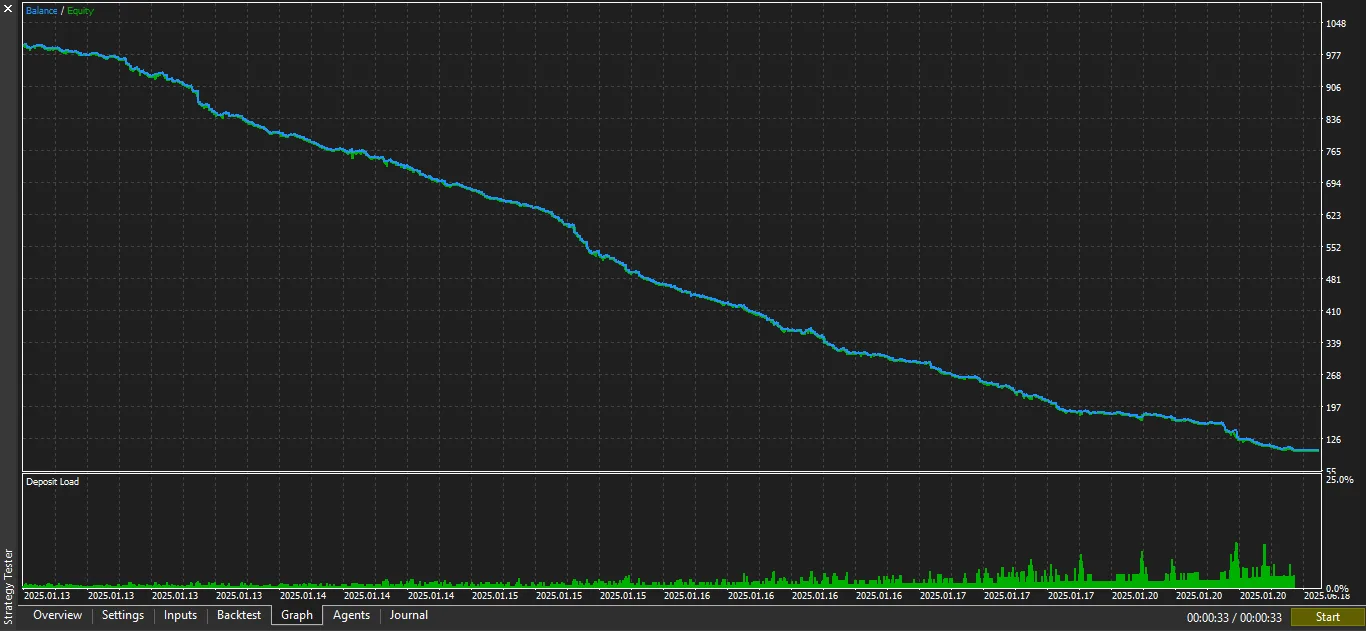
The robustness runs were not kinder. Run 2 repeated the same window in plain every-tick mode and lost $909.04 across five trading days. Run 3 covered all of 2025 with the real-tick request and was finished by 20 January, six trading days in. The January 2021 pair — one real-tick request, one plain every-tick — produced identical trade lists and the same −$899.48, spent within ten trading days. Five runs, three windows, two modeling modes: the outcome never changed.
| Run | Period and mode | Net | PF | Trades, win % | Final balance |
|---|---|---|---|---|---|
| Run 1 | Jun–Oct 2026, real-tick request | −$905.11 | 0.42 | 797, 40.65% in 4 days | $94.89 |
| Run 2 | Jun–Oct 2026, every tick | −$909.04 | 0.55 | 1,166, 45.11% in 5 days | $90.96 |
| Run 3 | 2025 full year, real-tick request | −$900.12 | 0.28 | 1,163, 20.38% in 6 days | $99.88 |
| Jan 2021 a | Jan 2021, real-tick request | −$899.48 | 0.31 | 1,596, 16.42% in 10 days | ≈$106 |
| Jan 2021 b | Jan 2021, every tick | −$899.48 | 0.31 | 1,596, 16.42%, identical trades | ≈$106 |
The data-quality caveat cuts both ways. With about four ticks per minute bar, recurring fill seconds and a fixed 2-point spread in the June runs, the tester offered this EA unusually cheap, smooth conditions. A live raw-spread feed is typically wider and jumpier, which would raise costs per trade. We cannot know whether genuine real ticks would have changed the sign of the result, because no run achieved them; we can only report that under friendly synthetic conditions, the strategy failed everywhere.
Listing Claims vs Our Results
| Claim (listing) | What we measured | Match? |
|---|---|---|
| Designed for XAUUSD on M1 | All runs traded XAUUSD M1 only, Mon–Fri 08:00–17:59 server time | ✅ matches |
| Adaptive stop, target and trailing management | 453 of 797 exits at a broker stop; no exit labeled take-profit; stops slipped $392.99 past their level | ⚠️ partly |
| Spread protection (50-point cap) | Input on; the modeled 2-point spread never reached the cap, so no block was observed | ⚠️ partly |
| News filter pauses 90 min around USD/EUR events | Inputs on; zero news-filter lines in any tester log | — not testable in a demo |
| AI Geopolitical Filter monitors social media | Input on; the filter lives on the developer’s server via web request | — not testable in a demo |
| Volatility Spike Detector | Present in the inputs but off by default; we tested the defaults | ⚠️ partly |
| Works with any MT5 broker | On our broker’s data it lost about 90% in every one of five runs | ❌ not reproduced |
| Live signal shows the strategy working | The seller’s signal page shows +34.17% growth, but with $8,318.55 deposited and $7,415 withdrawn on a $4,032.25 balance | — not testable in a demo |
The signal deserves one careful paragraph. The seller links signal 2390372, which on 28 October 2026 showed 34.17% growth from 843 trades with a 2.09 profit factor. The same page shows an account opened on 6 October 2026 yet displays “8 weeks”, and MQL5 marks it as not open for subscription because of its leverage. Deposits of $8,318.55 against a $4,032.25 balance make the growth figure hard to read. It is a vendor-side record that a demo buyer cannot rerun, so it neither proves nor disproves anything here.
What the tester could check, it checked against the defaults, per the developer’s own instructions. On that ground the core promise — a scalper worth $1,599 on any MT5 broker — did not survive five attempts across three different years of market data. The filters that sit on the developer’s server could not be examined at all.
Risk Profile and When It Fails
The first risk is frequency itself. With trades averaging two and a half minutes and roughly 200 per day, small negative expectancy compounds brutally: the average trade lost $0.77 to $1.14 net across runs. Nineteen consecutive losing positions in the June run are what a −90% month looks like trade by trade. Per-position damage was capped — the worst single trade lost $33.51 anywhere — but there were thousands of cuts.
The second risk is the missing circuit breaker. The defaults set no equity floor, no daily loss cap and no daily profit lock. Once the balance could no longer support 0.01 lots, the EA spent months refusing its own orders — 88,725 refusals in Run 1, 211,153 in Run 3, over 1.18 million across the January 2021 pair. Nothing in the defaults stops the bleeding; the guards exist but ship switched off.
The third risk is data. Generated ticks made this test friendlier than a live account: a fixed 2-point spread, four ticks a minute and stop fills at recurring seconds. Stop exits still slipped $392.99 past their prices in Run 1. On a live feed with wider spreads, latency and requotes, the same logic would face harsher conditions than the ones it already failed.
How It Compares
On the same bench, the Ghost Scalper MT5 test report covered a $499 gold scalper that also failed its main run yet stayed tradeable in a reduced form, which we scored 3.5. Scalping Robot Pro is harsher: at triple the price, every default variant ended the account within days, not over a whole period.
The My AI Gold MT5 test report is the instructive opposite: a slower gold EA, about three trades a week, that stayed profitable across three developer set files and also scored 3.5. The difference is design, not luck — one system trades rarely with wide stops, the other trades constantly with thin margins. All our third-party results are collected under test reports.
Installing It and Testing It Yourself
Open the developer’s official page and click Free Demo; MetaTrader 5 installs it under Market in the Navigator, and the demo runs only in the Strategy Tester. Press Ctrl+R, pick Scalping Robot Pro, choose XAUUSD on M1, set a custom period and $1,000, and keep the inputs untouched — that is the developer’s own recipe. If your broker’s symbol or account differs, prefer your own: broker fit is the whole question for a scalper.
Before believing any number, open the Journal and search it for “real ticks discarded”. If every minute is discarded, as in our runs, your “real ticks” test ran on generated ticks regardless of what the report header claims; clearing the tick cache for the symbol usually changes that. Then leave the EA on a demo account for at least 90 days. The news calendar and the AI filter only work on a live connection, so a demo run is also the only way to see the features this EA charges for.
Advantages and Disadvantages
Advantages
- Fixed 0.01 lot by default, with martingale-style recovery and aggressive modes off.
- Per-trade damage is capped: the worst single loss anywhere was $33.51.
- Serious protective tooling: spread cap, session and holiday filters, news windows.
- 86 inputs, grouped and labeled; nothing undocumented appeared in testing.
- A free Market demo exists, and the seller ships updates regularly.
Disadvantages
- Five runs, three windows: about 90% of the deposit lost every time, within days.
- No run achieved real ticks; precision is unverified in either direction.
- The two paid-for features — news and AI geopolitical filters — cannot be verified in a demo.
- No automatic shutdown in the defaults: months of “Not enough money” refusals.
- Stops slipped $392.99 in the reference run even on synthetic ticks.
- $1,599 pricing against evidence that does not support it; listing copy still says v7.0.
Source, Licence and Distribution
- Rights
- Commercial product
- Developer
- MQL TOOLS SL
- Licence
- Commercial (MQL5 Market)
- Official price
- $1,599
- Version tested
- 7.1
- Tool type
- Expert Advisor
Commercial product. This report covers the trading logic and our own test results. Purchase, licensing, support and updates are handled by the developer via the official page. AlgoToolbox does not sell, host or sublicense this software.
How we tested it. We downloaded the free demo version from the developer’s official MQL5 Market page and ran it in the MetaTrader 5 Strategy Tester. Market demo versions only run in the Strategy Tester. The performance results from our own tests in this report are backtests, not live or forward trading. We did not buy a licence and did not receive a free copy or any payment from the developer. The developer did not see or approve this report before publication. We earn nothing if you buy this product. How we test and score.
Frequently Asked Questions
Does Scalping Robot Pro use martingale or a grid?
Not in the defaults we tested. Lot size stayed fixed at 0.01 in all five runs, and the recovery multiplier of 1.89 sat disabled. The EA can hold up to five simultaneous positions and places ladders of pending stop orders in one direction, which resembles a grid in shape. It never averaged into a losing position at a bigger size, though the recovery input would change that if enabled.
Is this Scalping Robot Pro MT5 review based on real ticks?
No, and that matters. Two runs requested real ticks, but the tester Journal shows every minute was discarded for mismatched prices, so generated ticks did the work. We therefore make no real-tick claims: the losses are consistent across five runs, yet a genuine real-tick pass on this terminal remains undone. Rerun it on your own data before drawing a final conclusion.
Why did the backtest stop trading after a few days?
Because the balance could no longer open 0.01 lots. Once equity fell to around $100, the Journal records repeated “Not enough money” refusals — 88,725 of them in the June run — while no new position opened. The EA keeps trying for the rest of the test, since its equity-protection and daily-loss inputs ship at zero, meaning off. It winds down by margin, not by any circuit breaker.
Is Scalping Robot Pro a scam?
Our test gives no basis for that label. The EA placed real stop orders, held five positions at most, kept its recovery mode off, and behaved exactly the same across three years of data. What we could not do is reproduce anything like a profitable result: five runs lost about 90% each. Poor measured performance and untestable filter claims are evidence; judge it on those.
Final Verdict
Scalping Robot Pro suits only traders who will rerun the free demo on their own broker’s exact symbol with clean tick data and then demo-trade it for months. It is not for anyone buying on the listing copy, and a backtest alone cannot validate its headline filters either way. The strategy’s fast, five-deep scalping shows no structural trick — but on our Exness setup it simply lost, quickly and everywhere.
Our conclusion from this Scalping Robot Pro MT5 review is short. Every default run we made lost about 90% within days, and the headline AI and news filters cannot be checked in a demo. If version 7.1 handles your broker’s data differently, a $0 demo test will show it in a week; until that evidence exists, the $1,599 price has nothing measured to stand on.
We score it 2.0 out of 5. Risk control scored highest, since defaults avoid martingale and cap position count; results and robustness dragged it down, with five failed runs and no verified real-tick pass. The five-criteria breakdown is in the verdict card above.
⚠️ Risk & Transparency Notice: All indicators, scripts, and backtest results on AlgoToolbox are for educational and testing purposes only. Trading Forex, CFDs, and cryptocurrencies carries significant financial risk. Past performance does not guarantee future results. This article may contain contextual affiliate links to tools or brokers we use. Read our full Risk Disclaimer.