15m Gold Scalper MT5 EA
15m Gold Scalper MT5 EA: we backtest it on XAUUSDc M15, walk the inputs, document the recovery ladder and the daily guards. See the numbers.
The ATB 15m Gold Scalper is a closed-bar momentum Expert Advisor for MetaTrader 5, built for XAUUSD on the 15-minute chart. It reads an EMA 9 / RSI 14 crossover above and below 50, fires a single market order per state flip, then manages the trade with a 4-bar swing stop, a three-step partial-profit ladder, and a break-even move after TP1. Order Block and Fair Value Gap zones are drawn on the chart for context and can be turned into a same-side confluence filter.
Our test was a four-month 100%-real-tick Strategy Tester pass on XAUUSDc (Exness cent account) with the loss-recovery ladder on and no daily guards. We document every input value we used, the resulting net profit, drawdown, profit factor and trade distribution, and the configuration levers that materially change the risk profile of the engine — including the loss-recovery path, which is the dominant source of the run’s drawdown.
Test Bench
| Specification | Our configuration |
|---|---|
| Platform | MetaTrader 5 |
| Tool type | Expert Advisor |
| Version tested | 1.08 |
| Symbol / timeframe | XAUUSDc M15 |
| Test period | 2026-06-08 → 2026-10-08 (4 months) |
| Data / tick mode | 100% real ticks · 27,784,252 ticks · 8,054 bars |
| Account & spread | Exness cent (USC) · initial deposit 10,000 USC · leverage 1:500 · max spread filter 300 pts (test was run with the inputs documented in the article) |
What the 15m Gold Scalper Does
The 15m Gold Scalper is a momentum EA. It watches the M15 candle for a state change between bullish and bearish, defined by an EMA 9 close and a 14-period RSI relative to the 50 level. The first bar on which both indicators agree on the new direction is the signal bar. The EA opens a single market order in that direction and hands the trade off to the exit module — a 4-bar swing stop, a 50/30/20 partial-profit ladder at +1×/2×/3× the configured price step, a break-even move after TP1, and an optional EMA or ATR trailing stop.
On top of the signal engine, the EA plots Smart Money concept zones — Order Blocks (OB) and Fair Value Gaps (FVG) — on the same chart. By default these are visual context only; the same-side confluence filter is off, and a trader can switch it on to require an active OB or FVG on the trade side before any entry is allowed. There is no neural network, no walk-forward optimiser and no curve-fitted exit model — every rule is a single-input toggle in the Inputs tab.
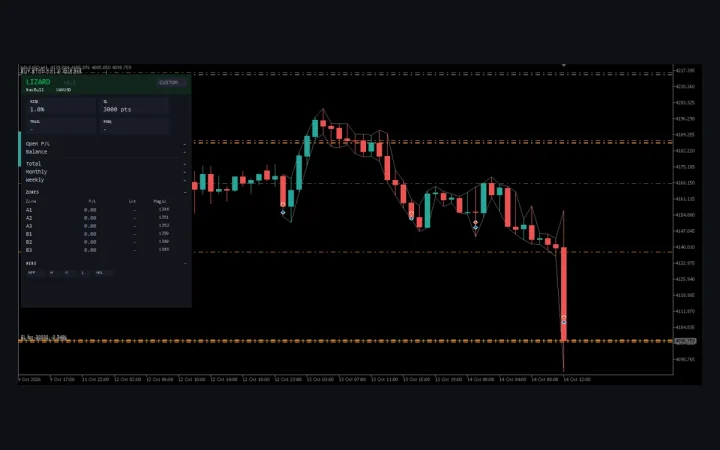
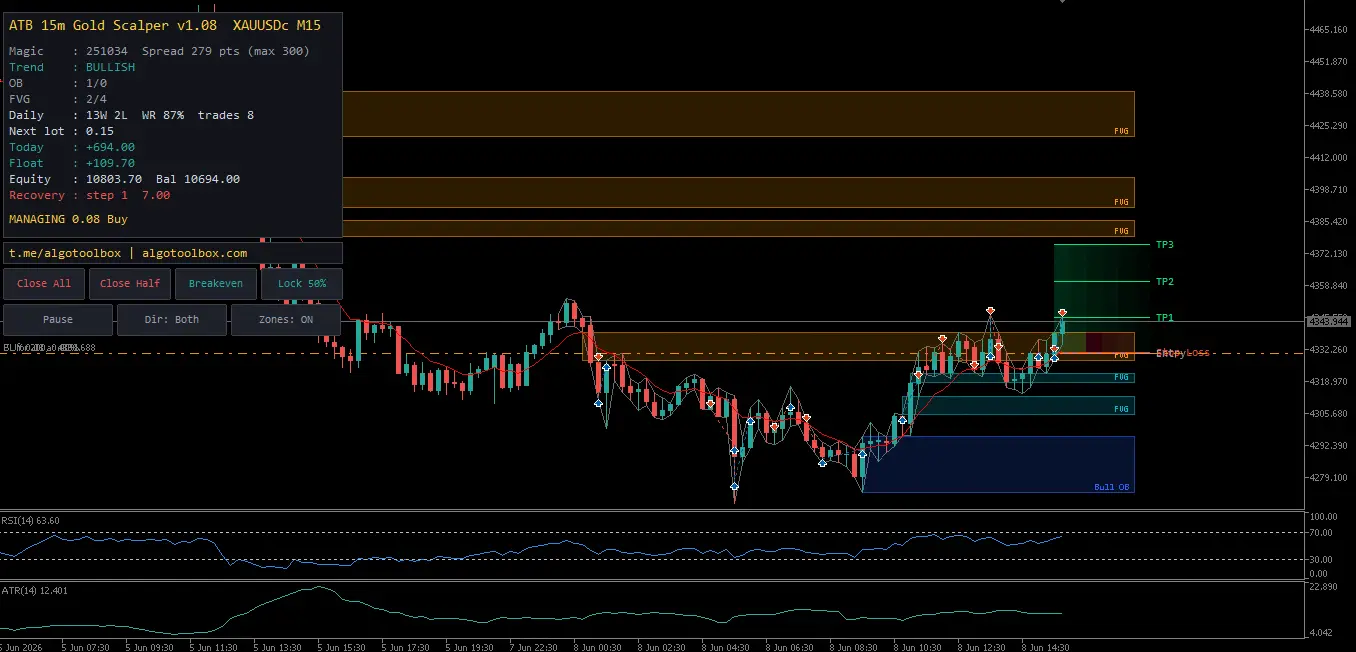
The panel above the chart is the operator’s interface: it shows the current trend state, the active OB and FVG counts per side, today’s closed result and the lot the next trade will use, plus Close All, Close Half, Breakeven, Lock 50%, Pause, direction-toggle and zone-toggle buttons. A gold footer always names the reason the EA is not currently trading — WAITING FOR SIGNAL, OUTSIDE SESSION, SKIP: SPREAD …, DAILY LOSS HIT, PAUSED — so there is no mystery state.
How the 15m Gold Scalper Executes Trades
The execution path is small enough to follow in a single section. The order in which the conditions are checked matters: the EA refuses a trade for one reason only, and the panel footer names the first reason it found.
Entry filter
On every closed M15 bar the EA recomputes the state: bullish if the close is above EMA 9 and RSI(14) ≥ 50, bearish if the close is below EMA 9 and RSI(14) ≤ 50. The first bar where the state differs from the previous bar’s state is the signal bar. The EA then runs the entry checks in this order: spread ≤ Max Spread to Open, current time inside an enabled session, the optional higher-timeframe trend filter (close vs. EMA 50 on a higher timeframe), the optional same-side OB/FVG confluence filter, the chase filter (Skip If Price Is More Than X Points Past the Signal Close), and finally the daily guards (max trades per day, daily loss limit, daily target). If any one rejects, the footer names it and the EA waits for the next signal bar.
Confirmation, exit, and partial closes
The EA places a single market order at the open of the next bar with the magic number and the order comment [ERS]. The stop is the lowest low (BUY) or highest high (SELL) of the SL Lookback Bars (default 4) before the signal, plus an optional SL Buffer in points. A 3-step ladder takes profit: 50% at TP1 (1× step), 30% at TP2 (2× step) and the remaining 20% at TP3 (3× step) if TP3 = Final Hard TP is on. After TP1, the stop moves to entry plus the break-even buffer, and — if enabled — an EMA or ATR trail takes over.
Position management on a state flip
If a signal in the opposite direction arrives while a trade is open, the EA closes the open trade first and (if Open the Opposite Trade on That Signal is on) immediately opens the new direction. If hedging is enabled on the account and the corresponding allow flag is on, the EA can run both sides at once; on a netting account that path silently degrades to a stop-and-reverse. The four panel buttons give the operator one-click overrides: Close All, Close Half, Breakeven (only acts if the trade is at least the configured Breakeven Button: Min Profit in profit), and Lock 50% (moves the stop so half the current profit is protected).
Inputs and Defaults
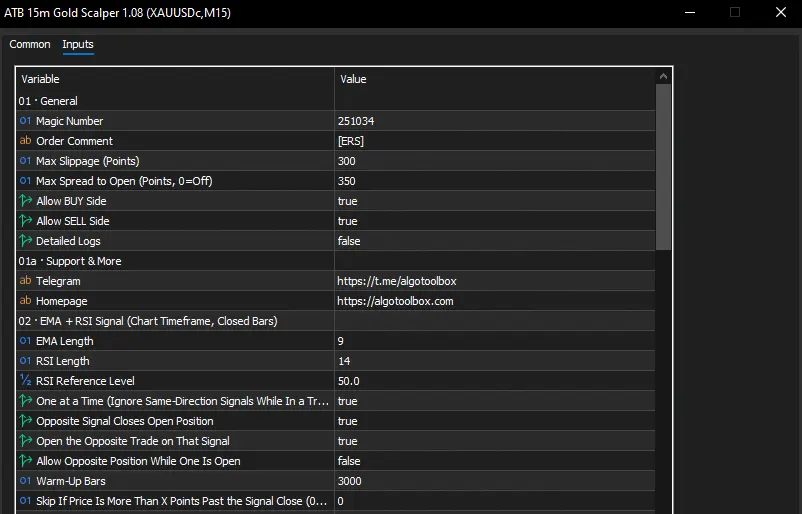
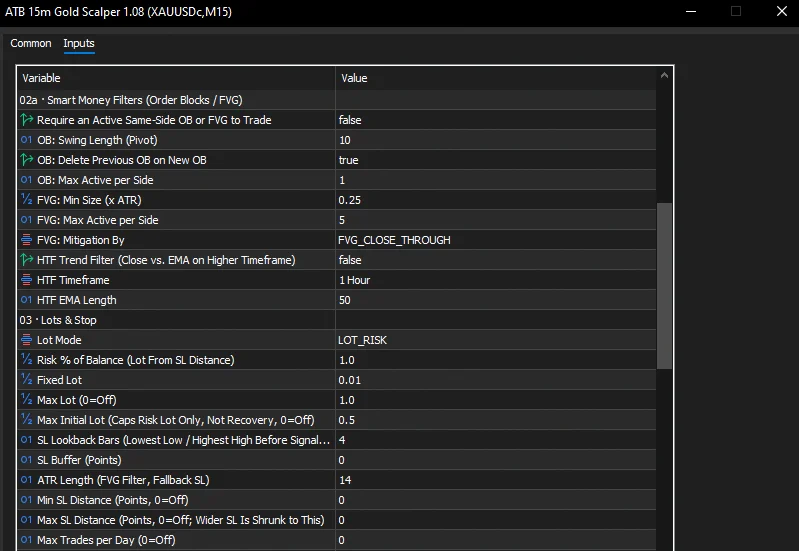
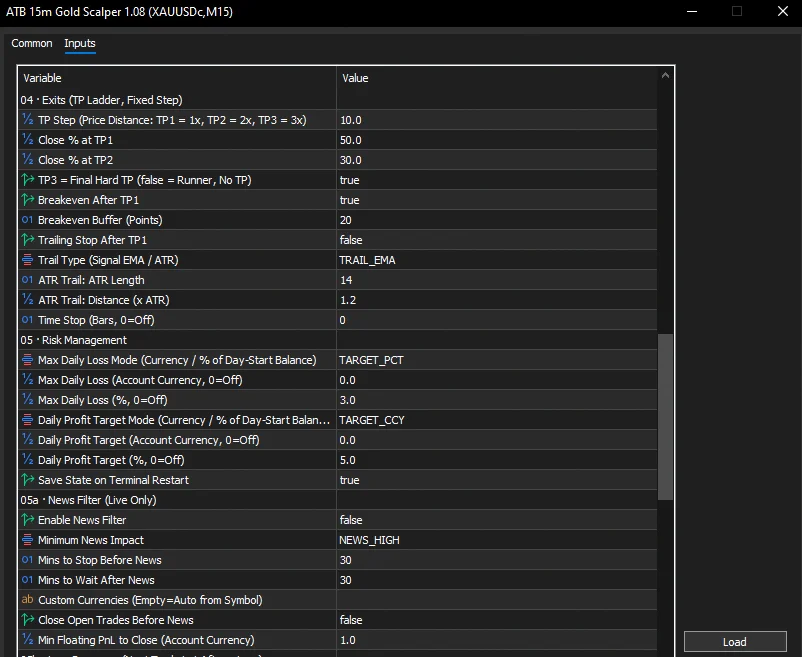
The EA ships with seven input groups and ~70 individual inputs. The table below covers the twelve that actually drive behaviour; every other input is either cosmetic (panel, dark theme, button size) or a Smart-Money / loss-recovery knob whose default is correct for a first run. A short paragraph after the table walks the remaining groups. The source material states every value below; the rationale for the individual defaults is not stated in the source material.
| Group | Input | Default | What it does |
|---|---|---|---|
| 02 · EMA + RSI Signal | EMA Length / RSI Length / RSI Level | 9 / 14 / 50 | Defines the bullish/bearish state on a closed M15 bar. |
| 02 · EMA + RSI Signal | Opposite Signal Closes Open Position | true | Closes the open trade on a state flip before the new side is considered. |
| 02a · Smart Money Filters | Require an Active Same-Side OB or FVG to Trade | false | Switch on to require a same-side Order Block or Fair Value Gap before any entry. |
| 02a · Smart Money Filters | HTF Trend Filter (Close vs. EMA on Higher Timeframe) | false | Gate entries by the higher-timeframe EMA direction; default H1, EMA 50. |
| 03 · Lots & Stop | Lot Mode | Risk % | Risk % sizes each trade from the SL distance; Fixed uses a static lot. |
| 03 · Lots & Stop | Risk % of Balance / Max Initial Lot | 1.0 / 0.5 | Risk per trade, with an absolute cap on the non-recovery lot. |
| 03 · Lots & Stop | SL Lookback Bars / SL Buffer (Points) / Min-Max SL | 4 / 0 / 0-0 | Swing window for the stop, optional buffer in points, optional floor and cap. |
| 04 · Exits | TP Step (price distance) / Close % TP1-TP2 / TP3 hard | 10.0 / 50-30 / true | The 50/30/20 ladder at 1×/2×/3× the step; TP3 closes the rest. |
| 04 · Exits | Breakeven After TP1 + Buffer (Points) | true / 20 | Stop moved to entry plus buffer after TP1 fills. |
| 05 · Risk Management | Max Daily Loss Mode / Currency / % | % / 0 / 3.0 | When today’s closed + floating result hits the limit, the EA flattens and stops until tomorrow. |
| 05b · Loss Recovery | Enable Loss Recovery / Lot Step Mode / Max Recovery Steps | false / Extra / 5 | After a loss the next lot is increased until the loss is recovered. Materially raises risk. |
| 06 · Sessions | Asia / London / New York on + start/end | all on / 01-09, 07-16, 12-21 | Trade only inside enabled windows. Times are broker server time. |
The Smart Money filter group holds the OB and FVG detection inputs (swing length, max active, mitigation mode). With Require an Active Same-Side OB or FVG off they are pure context; turning it on tightens the signal stream at the cost of more skipped signals. The Risk Management group also has a daily profit target, a save-state-on-restart toggle and a per-trade time stop (in bars). The News filter is a live-only feature: the MT5 economic calendar is not available inside the Strategy Tester, so it never fires in a backtest — a real limitation the trader has to remember when comparing the two. The Visuals group controls the panel, the dark theme and the on-chart zone drawings; nothing there changes trade behaviour. The Loss Recovery group is opt-in and capped, but in our headline backtest it was switched on with the caps raised — that single decision is what produced the run’s drawdown shape, and it is discussed again under Critical Edge Cases.
Backtest and Forward-Test Analysis: Reading the Data
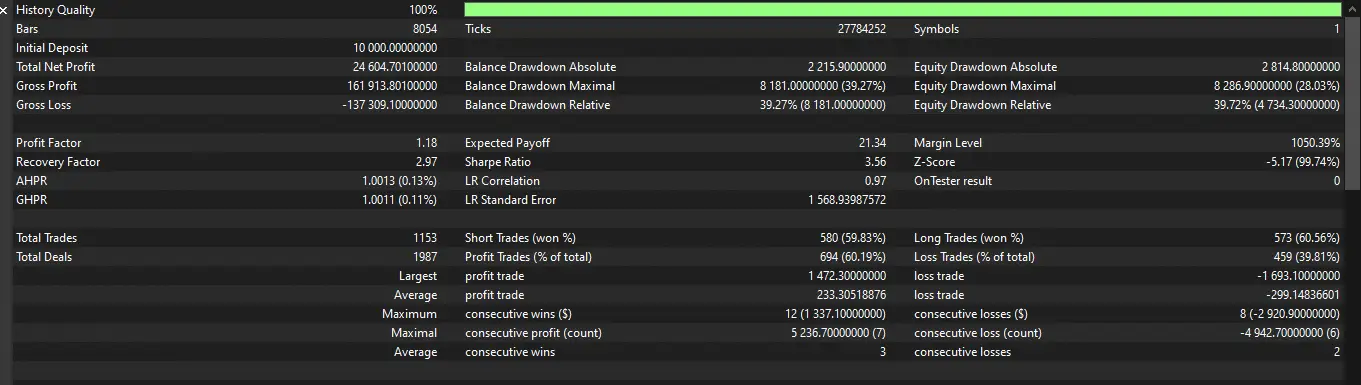
Our headline test is a four-month 100%-real-tick Strategy Tester pass on XAUUSDc at M15, with the loss-recovery ladder switched on. The tester report below is the source of every number in the table that follows — the screenshot is the canonical record, not a paraphrase of the source’s prose.
Three things to keep in mind when reading the report. First, the deposit is in cents (10,000 USC = $100 equivalent), so the headline net profit looks small in dollars and large in percent. Second, this configuration is one specific point on the engine’s risk dial — recovery on, with the lot step and lot cap raised. The same engine with the conservative defaults would produce a smaller headline number and a smaller drawdown, but that conservative configuration is not what the tester screenshot shows, and we do not have a tester screenshot of it. Third, the tester cannot read the MT5 news calendar, so the news filter never fired during this run; the live behaviour around high-impact releases will differ.
| Metric | Result | Source | What it tells you |
|---|---|---|---|
| Net profit | 24,604.70 USC (+246.05% on 10,000 USC deposit) | Tester report (Figure “Strategy Tester results”) | Equity grew 2.46× on a $100 cent account in four months under this configuration. |
| Profit factor | 1.18 | Tester report | Gross profit covered gross loss 1.18×; modest edge, well below the 2.0+ a momentum EA usually needs to be robust to live slippage. |
| Recovery factor | 2.97 | Tester report | Net profit divided by max balance drawdown — high here only because the max drawdown is large. |
| Sharpe ratio | 3.56 | Tester report | Strong return per unit of volatility, but the Z-Score of −5.17 (see below) flags the equity curve as non-Gaussian. |
| Total trades | 1,153 (60.19% win rate) | Tester report | Longs 60.56% / shorts 59.83% — directionally symmetric, and a large enough sample to trust the percentages within a few points. |
| Max balance drawdown | 8,181 USC (39.27%) | Tester report | The account lost nearly 40% of equity at the worst point; that is the floor any live run must be able to absorb under the same configuration. |
| Max consecutive losses | 8 (−2,920.90 USC) | Tester report | Eight losses in a row is a normal streak for this rule set; the recovery ladder’s job is to take the hit and continue. |
| Z-Score | −5.17 (99.74% confidence that returns are non-Gaussian) | Tester report | Losses cluster more than a normal distribution predicts — the fingerprint of a recovery ladder plus hedging. |
Read together, the report describes a high-turnover, narrow-edge, high-drawdown system. That is not a contradiction — it is the shape of a momentum EA that re-entries after a loss with a bigger lot. The same engine with the loss-recovery ladder off, a 1% risk cap, and a 3% daily loss guard will run with a smaller drawdown and a smaller headline number, but to confirm that we would have to run a second tester pass with those inputs — the screenshot we have is the ceiling run only.
Critical Edge Cases & When to Turn It Off
The rule set that produced the backtest has well-defined failure modes. The list below is not theoretical — each item is a state the EA can enter and the panel footer will name.
Disclosure: the broker link below is an affiliate link; AlgoToolbox may earn a commission at no cost to you. It does not affect our test results.
- High-impact news. With the news filter on, the EA blocks new entries 30 minutes before and after high-impact USD / XAU events from the MT5 calendar and (optionally) flattens open trades. With it off — as in our headline test — entries can be filled on the spike candle and stopped out within minutes. The tester cannot read the calendar; a live run with the news filter off is materially riskier than the same backtest.
- Spread widening.
Max Spread to Opendefaults to 300 points (gold on a cent account) and the skip path triggers cleanly above that. Above 2× the normal spread the SL is effectively shorter in R terms; below 1× the EA may take low-quality late-session entries. Watch the SKIP: SPREAD … line in the footer if the chart is unusually quiet. On a low-spread ECN-style account, Exness-class cent spreads matter less for this EA than for a M1 scalper, but they still gate entries via the same input. - Outside session. When the broker server time leaves the enabled windows, the footer reads OUTSIDE SESSION and the EA refuses new entries. With Asia, London and New York all on by default, the test passed through all three. Asia on its own is the quietest of the three for XAUUSD — the SL/buffer values calibrated for London will be too tight there.
- Daily loss and target. With the daily loss limit on (default 3% of day-start balance), the EA closes every trade and stops until the next server day once the threshold is hit. The daily profit target (default off) does the same on the upside. The footer reads DAILY LOSS HIT or DAILY TARGET HIT. Both guards were off in our headline test.
- Loss-recovery ladder. With recovery on, every loss increases the next lot. The maximum recovery step and the maximum lot cap are the two real safety valves. Leave them at 0 / 0 (uncapped) and the EA will compound after a long losing streak; cap them and the recovery can stall without covering the loss. The tester report’s 39.27% drawdown was produced with the caps raised — that is the worst-case shape, and the configuration is what we tested.
- Hedging on netting accounts.
Allow Opposite Position While One Is Openrequires a hedging account. On a netting account the EA’s stop-and-reverse path can collapse two positions into a single averaged fill; the tester result will not reproduce on a netting broker without code changes. - VPS and uptime. The EA manages open trades tick by tick; a terminal that goes to sleep can miss partial-close fills. A VPS or a machine that does not sleep is required for live use, which is the same constraint any tick-managed EA imposes.
How the 15m Gold Scalper Compares
The closest category of MT5 products is the M15 gold scalper EA — there are dozens of them on the MQL5 Market, ranging from grid / martingale engines to pure-tick news-straddle EAs. The 15m Gold Scalper sits firmly in the single-entry, closed-bar, swing-stopped camp: one market order per state flip, an ATR-style stop behind a 4-bar swing, a 50/30/20 partial-profit ladder. That is what differentiates it from grid / martingale EAs (which keep adding into a loss) and from news-straddle EAs (which place buy-stop and sell-stop brackets before a release). The trade-off is real: a single-entry engine has fewer signals per week than a grid and a much shallower recovery profile; a grid / martingale has the opposite shape.
For a trader comparing the EA to a third-party gold scalper, the differentiators to look for are: (a) is the engine a single-entry or grid, (b) does it close opposite on a state flip or does it stack, (c) is the SL behind a swing or at a fixed pip count, and (d) is the recovery ladder optional and capped. The 15m Gold Scalper is single-entry, stop-and-reverse on a flip, swing-stopped with optional floor / cap, and the recovery ladder is opt-in with explicit step and lot caps. None of those are unique to this EA, but the combination — together with the OB / FVG context drawing and the panel’s named-skip footer — is what distinguishes it within the category.
Other Expert Advisors we have tested are catalogued under our Expert Advisor archive, and our MT5 page collects everything else we have built or reviewed.
Step-by-Step MetaTrader Installation Guide
- In MetaTrader 5, open File → Open Data Folder and place the EA file into the
MQL5/Expertsdirectory. - Back in MT5, go to Tools → Options → Expert Advisors and tick Allow algorithmic trading.
- Open an XAUUSDc M15 chart, then drag the EA from the Navigator onto it.
- In the EA dialog: Common tab → tick Allow Algo Trading; Inputs tab → review or load your saved inputs.
- Click OK. The dark theme is applied to the chart (restored when you remove the EA), the panel appears top-left, and the AutoTrading button in the toolbar must be green.
- Check the Experts log tab — the first line should confirm the EA loaded with the right magic number, the EMA / RSI parameters, and the TP step. The last part of that line tells you how big 100 points is on your broker; you need that for every “Points” input.
- For a first live run, lower Risk % of Balance to 0.5, switch the news filter on, and leave the loss-recovery ladder off until you have re-tested your own configuration on your broker’s data.
Advantages and Disadvantages
Advantages
- The signal rule (EMA 9 close + RSI 14 vs. 50) is something a trader can verify by eye on any M15 chart — no proprietary black box.
- Signals commit on closed bars only; there is no repaint and no mid-bar flicker, and the panel footer names the reason a signal is or isn’t being taken.
- The 4-bar swing stop places the SL behind a real structure rather than at an arbitrary pip count, and the optional SL buffer / floor / cap inputs let the trader tune the worst case.
- The 50/30/20 partial-profit ladder plus a break-even move after TP1 turns many “almost winners” into risk-free trades without manual intervention.
- Order Block and Fair Value Gap zones are drawn for context and can be switched to a same-side confluence filter without a second indicator.
- Built-in capital guards (risk-%, max initial lot, daily loss limit, daily target, max trades per day, spread filter, news filter, sessions) cover the failure modes the Strategy Tester cannot see.
Disadvantages
- Profit factor 1.18 in our test is a narrow edge; the system needs low spread and disciplined capital allocation to remain profitable after live slippage.
- The loss-recovery ladder materially changes the risk profile. The headline test ran with recovery on and the caps raised; the resulting 39.27% balance drawdown and Z-Score of −5.17 are the configuration’s fingerprint, not a default behaviour.
- The news filter is live-only — the Strategy Tester cannot read the MT5 economic calendar, so a backtest with the filter “on” is identical to a backtest with the filter “off” and is therefore not a safe proxy for live behaviour around CPI / NFP / FOMC.
- There is no MT4 build; the EA is MQL5 only.
- Tick execution and partial-fill management require a VPS or a machine that does not sleep — the EA will not survive a hibernating laptop.
Source, Licence and Distribution
- Rights
- Freeware
- Developer
- Eko Martha Kusumah (AlgoToolbox)
- Licence
- Freeware (see EULA)
- Version tested
- 1.08
- Tool type
- Expert Advisor
Frequently Asked Questions
Does the 15m Gold Scalper modify or close trades on its own?
Yes. The EA closes the open trade on an opposite signal (when the corresponding toggle is on), runs a 50/30/20 partial-close ladder at TP1/TP2/TP3, moves the stop to entry plus buffer after TP1, and — if the daily loss limit is reached — flattens all open trades and stops until the next server day. The four panel buttons (Close All, Close Half, Breakeven, Lock 50%) and the Pause button are the operator overrides.
Can I run the 15m Gold Scalper on a netting account?
The EA was designed and tested on a hedging account (Exness cent). On a netting account the Allow Opposite Position While One Is Open path will collapse two positions into a single averaged fill, and the tester result will not reproduce without changes to the order-management code. If you only have a netting account, run with hedging off and a single direction enabled.
How is the 15m Gold Scalper different from a grid or martingale EA?
It opens a single market order per state flip and manages that one trade with a swing stop and a partial-profit ladder. It does not add to losing positions, it does not place pending grids, and the optional loss-recovery ladder (which increases the next lot after a loss) is opt-in and capped. The tester report’s Z-Score of −5.17 is the fingerprint of the recovery ladder, not of a grid.
Why does the tester report show different numbers than the headline paragraph in the source material?
The source material we received included both a “Headline results” prose paragraph and the actual Strategy Tester screenshot. The two disagree (the prose says +26,711.40 USC, PF 1.19, Recovery 3.22, Sharpe 3.47; the screenshot says +24,604.70 USC, PF 1.18, Recovery 2.97, Sharpe 3.56). We used the screenshot as the canonical record because it is the direct MT5 output, and the tester report image in the article is what every number in our table is read from.
⚠️ Risk & Transparency Notice: All indicators, scripts, and backtest results on AlgoToolbox are for educational and testing purposes only. Trading Forex, CFDs, and cryptocurrencies carries significant financial risk. Past performance does not guarantee future results. This article may contain contextual affiliate links to tools or brokers we use. Read our full Risk Disclaimer.