Common MetaEditor Compile Errors in MQL5 (And How to Fix Each One)
How to read MetaEditor's F7 error log, fix broken #include paths and accidental MQL4 syntax, wire indicator_plots buffers properly, and stop runtime traps.
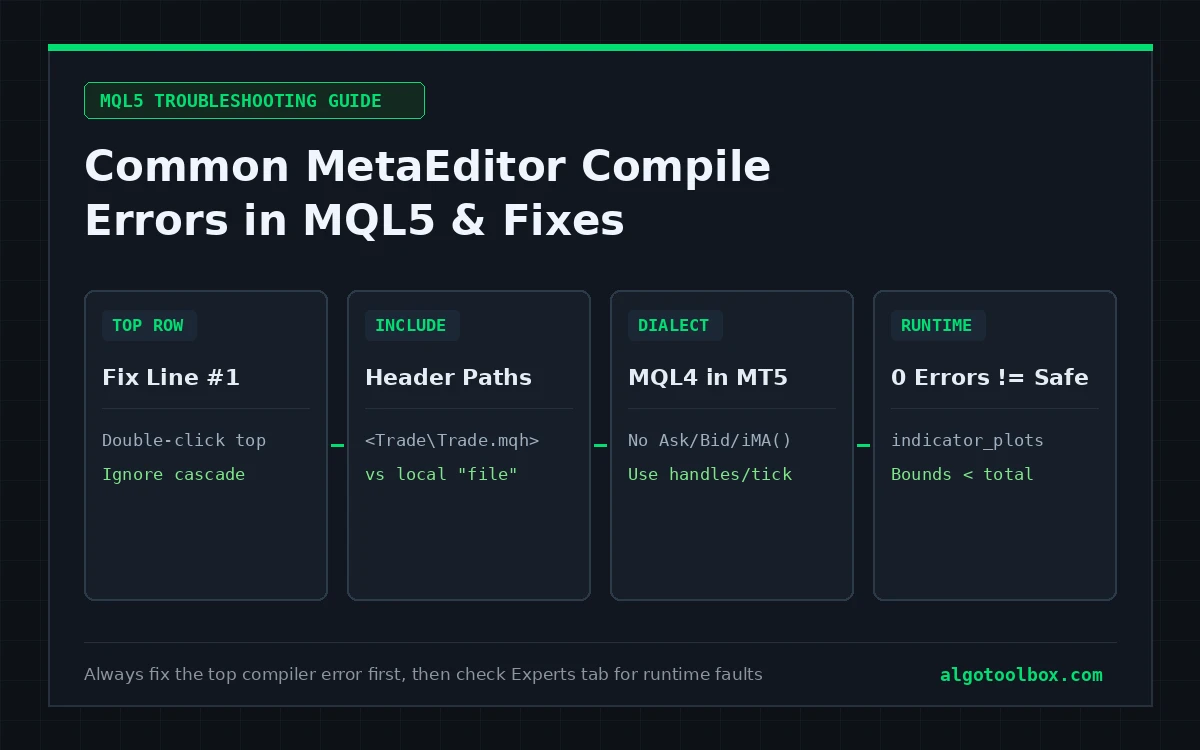
Pressing F7 on a custom script and seeing thirty red lines fill the Toolbox panel looks worse than it is: most MetaEditor compile errors in MQL5 trace back to four repeatable causes — a missing header file, MetaTrader 4 code pasted into a MetaTrader 5 editor, a single missing brace or semicolon cascading downward, or mismatched indicator buffer declarations.
Better still, MetaEditor gives you the exact file, line, and character column where parsing broke, and MetaTrader 5’s Experts tab does the same for runtime faults that pass compilation with 0 errors and crash on chart attach. Here is how to read those messages and fix each family cleanly.
On this page9 sections
- Rule #1: Fix Only the Top Error Row Before Recompiling
- Quick Lookup: Common MetaEditor & MT5 Error Messages
- Fixing “can’t open … include file” Path Errors
- Spotting MQL4 Code Inside MetaEditor 5 (Ask, Bid, iMA, OrderSend)
- Replacing Inline MQL4 Indicator Calls Without Freezing MT5
- “0 Errors” But Blank Plots: Buffer Ordering and Initialization
- Fixing Runtime “array out of range” Unloads in the Experts Tab
- Where to Go Next
- FAQ
Rule #1: Fix Only the Top Error Row Before Recompiling
Never start troubleshooting from the bottom of MetaEditor’s Errors panel. Because MQL5 uses a top-down C++-style parser, a single missing semicolon on line 38, a missing .mqh header on line 6, or one extra closing brace } inside OnInit() knocks the compiler out of scope for the rest of the file. Lines that are completely valid suddenly report twenty or forty cascading errors such as unexpected token, declaration without type, or 'return' - expressions are not allowed on a global scope.
- Press F7 in MetaEditor to compile.
- Scroll all the way to the first red circle at the top of the Toolbox → Errors tab (leave yellow triangle warnings for second pass).
- Double-click that top row so the editor jumps directly to the offending line and column, fix only that line (or the line immediately above it, where missing semicolons hide), and press F7 again.
In day-to-day MQL5 work, fixing line #1 routinely wipes out fifteen downstream syntax errors in a single recompile.
Quick Lookup: Common MetaEditor & MT5 Error Messages
| Exact message | Where it shows up | Root cause | Direct fix |
|---|---|---|---|
can't open "...mqh" include file |
MetaEditor (F7) |
Header missing or stored in the wrong directory relative to MQL5\Include\. |
Put shared libraries under MQL5\Include\ (<...>) or beside the .mq5 file ("..."). |
'Ask' - undeclared identifier (or 'Bid', 'OP_BUY', 'IndicatorCounted') |
MetaEditor (F7) |
MQL4 (MetaTrader 4) code opened or renamed to .mq5. |
Compile in MT4, or replace with SymbolInfoDouble, CTrade, and MQL5 OnCalculate. |
'iMA' - wrong parameters count (or 'iRSI', 'iATR') |
MetaEditor (F7) |
Calling MQL4’s single-step indicator value signature inside MQL5. | Create an int handle once in OnInit() and read values with CopyBuffer(). |
'OrderSend' - wrong parameters count |
MetaEditor (F7) |
MQL4 9/10-argument ticket call instead of MQL5 request struct. | Include <Trade\Trade.mqh> and execute via CTrade methods. |
'{' - unbalanced parentheses / unexpected end of program |
MetaEditor (F7) |
Unclosed { or ( inside a nested if, for, or switch block. |
Click next to each opening { from the top of the function down to verify its highlighted closing pair. |
'OnCalculate' - wrong parameters count |
MetaEditor (F7) |
Custom parameter list that matches neither of MQL5’s two legal signatures. | Use either the 5-parameter single-array signature or the full 10-parameter OHLCV signature verbatim. |
0 errors, 0 warnings — nothing plots on chart |
Live / Tester chart | INDICATOR_CALCULATIONS buffer bound at an index lower than indicator_plots. |
Bind all INDICATOR_DATA plot buffers at indices 0 .. P-1 first, then calculation buffers P .. B-1. |
array out of range in '...mq5' (line, col) |
MT5 Experts tab |
Negative index (i - lookback < 0) or subscript >= rates_total on attach. |
Return 0 when rates_total < minBars, clamp start, and resize dynamic arrays. |
Fixing “can’t open … include file” Path Errors
When you install multi-file projects from GitHub (building on the folder layout covered in how to install a custom MT5 indicator from GitHub), the delimiters around an #include statement tell MetaEditor two completely different places to search:
- Angle brackets —
#include <Trade\Trade.mqh>: searches strictly inside your active Data Folder’sMQL5\Include\tree. Built-in standard library classes like<Trade\Trade.mqh>ship with every MT5 installation. If an open-source EA writes#include <CustomGrid\RiskManager.mqh>, you must place theCustomGridfolder insideMQL5\Include\CustomGrid\. - Double quotes —
#include "SignalHelpers.mqh": searches relative to the folder containing the.mq5file being compiled. If a repository stores bothMyIndicator.mq5andSignalHelpers.mqhinsidesrc/and you copy only the.mq5file intoMQL5\Indicators\, line 1 fails immediately.
If a file clearly exists on your drive and MetaEditor still reports can't open include file, you are almost certainly looking inside the wrong terminal profile. Open MetaTrader 5, click File → Open Data Folder, and verify the files sit inside that exact hashed profile directory rather than C:\Program Files\MetaTrader 5\ or a second broker’s terminal folder.
Spotting MQL4 Code Inside MetaEditor 5 (Ask, Bid, iMA, OrderSend)
A large share of indicators and EAs shared on older forums (or generated by LLMs mixing dialects) are written in MQL4 for MetaTrader 4. Saving an MQL4 script with a .mq5 extension does not make it MQL5 — MetaEditor 5 immediately flags MT4’s removed predefined variables and order constants as undeclared identifiers:
| MQL4 construct (fails in MetaEditor 5) | Typical compiler message | Equivalent MQL5 pattern |
|---|---|---|
Ask / Bid |
'Ask' - undeclared identifier |
SymbolInfoDouble(_Symbol, SYMBOL_ASK) and SYMBOL_BID, or SymbolInfoTick(_Symbol, tick). |
IndicatorCounted() + int start() |
'IndicatorCounted' - undeclared identifier |
OnCalculate(const int rates_total, const int prev_calculated, ...) returning rates_total. |
High[1] / Close[i] (global MT4 series) |
'High' - undeclared identifier |
Read the high[] and close[] arrays passed into OnCalculate(), or call iHigh(_Symbol, _Period, shift). |
OrderSend(Symbol(), OP_BUY, 0.1, Ask, 3, sl, tp) |
'OP_BUY' - undeclared identifier |
#include <Trade\Trade.mqh>, instantiate CTrade trade;, and call trade.Buy(0.10, _Symbol, ask, sl, tp);. |
OrdersTotal() + OrderSelect(i, SELECT_BY_POS) |
'SELECT_BY_POS' - undeclared identifier |
Iterate open positions with PositionsTotal() and PositionGetTicket(i) (pending orders sit separately under OrdersTotal()). |
Note that MQL5 separates open positions (PositionsTotal()) from working pending orders (OrdersTotal()) and historical execution deals (HistoryDealsTotal()). Translating an MT4 loop without separating positions from pending orders is one of the fastest ways to make an EA miscount active exposure.
Replacing Inline MQL4 Indicator Calls Without Freezing MT5
When MetaEditor throws 'iRSI' - wrong parameters count or 'iATR' - wrong parameters count, resist the urge to guess parameter counts inside your calculation loop. In MQL4, iATR(NULL, 0, 14, 1) returned the ATR number for bar 1 directly. In MQL5, iATR(_Symbol, _Period, 14) returns an integer indicator handle, and you pull values out of that handle using CopyBuffer():
int gAtrHandle = INVALID_HANDLE;

int OnInit()
{
   // 1. Create the handle ONCE during initialization
   gAtrHandle = iATR(_Symbol, _Period, 14);
   if(gAtrHandle == INVALID_HANDLE)
   {
      Print("Failed to create iATR handle, error = ", GetLastError());
      return INIT_FAILED;
   }
   return INIT_SUCCEEDED;
}

void OnDeinit(const int reason)
{
   // 2. Release the handle cleanly when removed
   if(gAtrHandle != INVALID_HANDLE)
      IndicatorRelease(gAtrHandle);
}

// 3. Inside OnTick() or OnCalculate(): copy values from the existing handle
double atrVal[1];
if(CopyBuffer(gAtrHandle, 0, 1, 1, atrVal) == 1)
{
   double closedBarAtr = atrVal[0]; // Shift 1 = last closed bar
}
Critical performance trap: if you call iATR(_Symbol, _Period, 14) inside OnTick() or OnCalculate() instead of OnInit(), the file will compile with 0 errors — and allocate a brand-new indicator instance on every incoming tick until MetaTrader 5 exhausts memory and grinds to a halt.
“0 Errors” But Blank Plots: Buffer Ordering and Initialization
Nothing frustrates new MQL5 coders faster than seeing 0 errors, 0 warnings in MetaEditor, attaching the indicator, and getting an empty chart. Check two silent rules governing SetIndexBuffer():
- Plot buffers must occupy the lowest indices first: if your header declares
#property indicator_buffers 10and#property indicator_plots 5, indices0through4must be your visibleINDICATOR_DATAplots (plus anyINDICATOR_COLOR_INDEXarrays paired with color plots), while internalINDICATOR_CALCULATIONSscratch arrays go into indices5through9. Binding a calculation array at index0pushes a real visual plot pastindicator_plots - 1, where MT5 never draws it. - Initialize empty buffer cells explicitly: MQL5 does not zero-fill newly allocated indicator buffers. Any bar where your code forgets to assign either a price or
EMPTY_VALUEretains raw floating-point garbage (DBL_MAXor arbitrary memory values), compressing your chart scale into a flat line at the bottom of the window.
Here is the exact buffer layout used in our Absorption Radar MT5 port (5 visual plots followed by 5 internal reference buffers):
#property indicator_chart_window
#property indicator_buffers 10
#property indicator_plots   5

// Visual plots bound to 0..4 FIRST
SetIndexBuffer(0, bEma,     INDICATOR_DATA);
SetIndexBuffer(1, bBuy,     INDICATOR_DATA);
SetIndexBuffer(2, bSell,    INDICATOR_DATA);
SetIndexBuffer(3, bSweepUp, INDICATOR_DATA);
SetIndexBuffer(4, bSweepDn, INDICATOR_DATA);

// Internal Entry / SL / TP calculation buffers bound to 5..9 AFTER all plots
SetIndexBuffer(5, bEntry,   INDICATOR_CALCULATIONS);
SetIndexBuffer(6, bSL,      INDICATOR_CALCULATIONS);
SetIndexBuffer(7, bTP1,     INDICATOR_CALCULATIONS);
SetIndexBuffer(8, bTP2,     INDICATOR_CALCULATIONS);
SetIndexBuffer(9, bTP3,     INDICATOR_CALCULATIONS);
Our Liquidity Hunter MT5 port follows the same rule with 13 total buffers and 8 visible plots (0..7 plotted, 8..12 calculation-only).
Fixing Runtime “array out of range” Unloads in the Experts Tab
When an indicator or EA compiles cleanly, attaches to a chart, and unloads itself half a second later, open View → Toolbox (Ctrl+T) → Experts inside MetaTrader 5 (note: runtime script logs print to the Experts tab, whereas terminal/server connection logs print to Journal). Look for runtime error messages citing an exact line and column:
array out of range in 'CustomIndicator.mq5' (162,19)Jump to line 162 in MetaEditor (Ctrl+G) and check three recurring causes:
- Insufficient bars during initial symbol sync: when you open a symbol or higher timeframe for the first time, MT5 may call
OnCalculate()whilerates_totalis still0or smaller than your lookback window. Guard the top ofOnCalculate()before indexing anything — for example,LiquidityHunter.mq5opens withif(rates_total < swingLen * 2 + 3) return 0;so it waits safely until history arrives. - Negative index on early bars: if your loop starts at
i = 0on chronological arrays and evaluateshigh[i - 14], iteration zero requestshigh[-14]and aborts immediately. Start your loop atint start = (prev_calculated <= 0) ? lookback : prev_calculated - 1;wherelookbackcovers the deepesti - koffset in your loop. - Unresized non-buffer arrays: arrays registered via
SetIndexBuffer()automatically resize torates_totalon every bar, whereas ordinary dynamic arrays (double scratch[];) stay at length0until you explicitly callArrayResize(scratch, rates_total).
Where to Go Next
- Setting up a GitHub repository in MetaTrader 5 for the first time? Read how to install a custom MT5 indicator from GitHub.
- Converting Pine Script functions, sessions, and
request.security()calls into MQL5? Check porting a TradingView indicator to MT5: what breaks first. - Once your code compiles cleanly and stays attached, audit its bar-close signal behavior with how to test if an MT5 indicator repaints, or study complete
.mq5source files on Our Builds.
FAQ
Should I fix yellow compiler warnings if MetaEditor says 0 errors?
Always fix warnings that affect execution math — especially possible use of uninitialized variable (which feeds arbitrary stack bytes into stop or lot arithmetic), truncation of constant value, and unchecked trade return values. Harmless informational notices such as an unused input comment string will not affect runtime behavior, but keeping warnings at zero makes real bugs stand out immediately.
Can MetaEditor 5 compile .mq4 files for MetaTrader 4?
No. MetaEditor 5 opens .mq4 files as plain source text, but pressing F7 invokes the MQL5 compiler targeting .ex5 binaries. To compile an unmodified .mq4 into an .ex4 file, open it inside MetaTrader 4’s bundled MetaEditor 4.
Why did my compiled .ex5 stop loading after a MetaTrader 5 terminal update?
Usually the opposite happens: an older MT5 terminal build refuses to load an .ex5 compiled by a much newer MetaEditor build (EX5 loading failed). Update your MetaTrader 5 terminal to the current release — or, when you have the .mq5 source, recompile locally with F7 inside that terminal’s own MetaEditor.
Why does my indicator compile cleanly, attach, and freeze the whole MT5 window?
In almost every case, either a while loop inside OnCalculate() fails to increment its exit variable on flat/doji candles, or an indicator handle (iMA, iRSI, iCustom) is being created inside OnCalculate() on every tick instead of once inside OnInit().
Why do edits I make in MetaEditor not show up on my live chart after pressing F7?
Check two things: first, confirm the file you edited sits inside the active terminal’s File → Open Data Folder (MQL5\Indicators\ or MQL5\Experts\) rather than a second MT5 installation or your Downloads folder; second, confirm the Errors tab actually printed 0 errors — when compilation fails with 1+ errors, MetaEditor leaves the old .ex5 untouched on disk, so your chart keeps running the previous working build.
Risk & Transparency Notice: All indicators, scripts, and backtest results on AlgoToolbox are for educational and testing purposes only. Trading Forex, CFDs, and cryptocurrencies carries significant financial risk. Past performance does not guarantee future results. Read our full Risk Disclaimer.