Icarus Grid Bias MT5 EA
Icarus Grid Bias MT5 has one XAUUSDc M5 cent-account test with 50.81% relative equity drawdown. Review the full settings and limitations.
We built Icarus Grid Bias MT5 as our MT5 port of Ikarus: a hedging-only EA that opens two-sided grid cycles and can bias new cycles or counter-bias additions.
We ran one v1.04 functionality check on XAUUSDc M5 with H1 EMA bias. Our report shows 50.81% relative equity drawdown; this was not a performance study.
Test Bench
| Specification | Our configuration |
|---|---|
| Platform | MetaTrader 5 |
| Tool type | Expert Advisor |
| Version tested | 1.04 |
| Symbol / timeframe | XAUUSDc M5 chart; HTF EMA bias H1 (fast/slow 9/21), Skew action |
| Test period | 2026-09-07 to 2026-10-20 (visible graph axis; timezone not stated) |
| Data / tick mode | 100% history quality; 8,794 bars; 8,877,847 ticks; modeling mode not visible |
| Account & spread | Exness cent account (our test note); initial deposit 15,000 report units; spread/costs not visible; EA spread cap 0 (Off) |
What the MT5 Port Is and How It Is Built
This is an automated trading EA, not a visual signal indicator. It sends market orders for the chart symbol and manages buy and sell positions separately by Magic Number. The MT5 source declares version 1.04; a retail hedging account is required because separate long and short positions can coexist on one symbol, as described in the MQL5 account-properties reference.
We didn’t create the original Ikarus strategy. The linked Forex Factory thread, “Free Grid EA Ikarus – From zero to hero,” was started by MaPi and mentions an unnamed coder collaborator; its author describes the base grid as indicator-free. In our port, InpBiasMode = BIAS_OFF keeps the EA in its original two-sided grid mode; the H1/EMA values in “01a – Trend Bias” stay inactive until we select a bias mode. We did not have the exact MQL4 file for a line-by-line comparison, so we do not claim full parity.
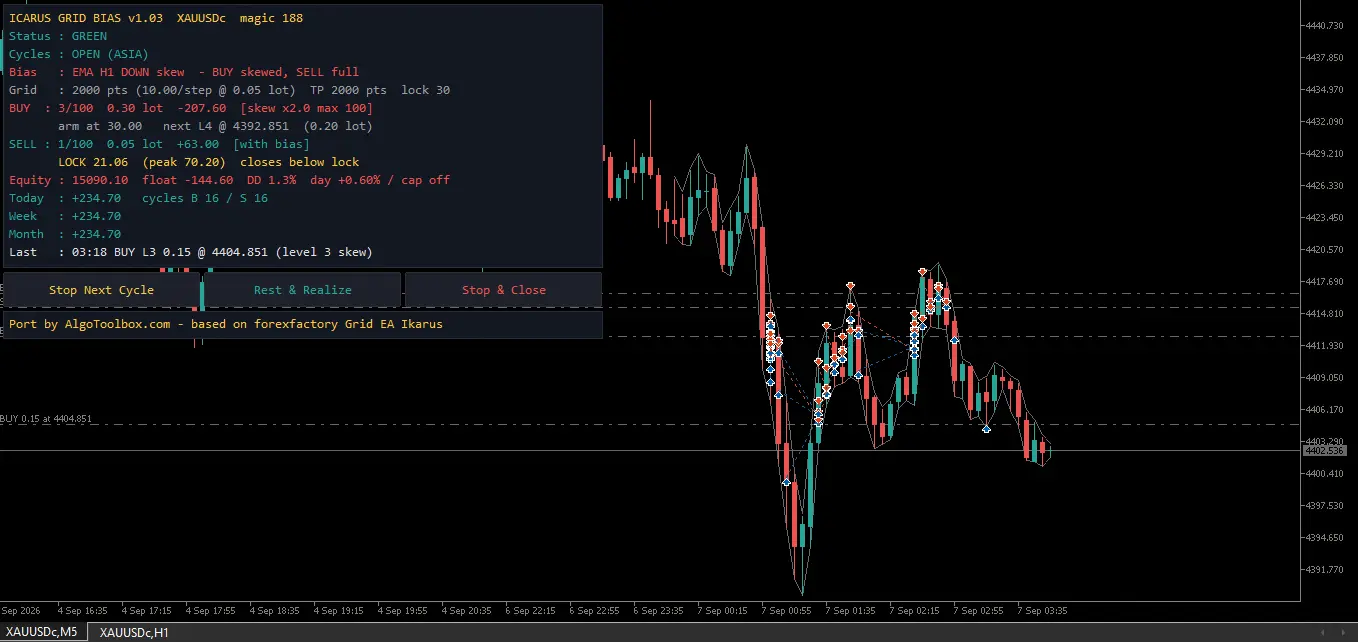
Our dashboard is a chart-object panel, not an entry-signal overlay. It shows side counts, lots, floating profit, bias, spread, account-wide equity and drawdown estimates, closed-profit summaries, and an estimated next level. It refreshes at most once per second; trade logic still runs on ticks.
How the Two-Sided Grid Opens and Closes Trades
1. Start a cycle
When you attach it, the EA checks for a hedging account and valid symbol tick/volume properties, sets its Magic Number, and loads saved state. On each tick it refreshes positions, bias, calendar state, daily controls, and entry gates. If a side is flat and the gates pass, it can open a new cycle at the base lot; Bias Off allows both buy and sell cycles.
Position management is filtered by chart symbol and Magic Number, not by the whole terminal. Give separate instances distinct Magic Numbers; two copies on the same symbol with the same number can see and manage the same positions. The dashboard’s equity and balance figures are account-wide, so they can include trades beyond this EA.
2. Add levels as price moves against a side
For an open side, the EA monitors the largest-lot leg, which the code treats as the latest level. When its loss reaches the next threshold, another market order may open if the position ceiling and spread check permit it. Grid-size and lot-size progressions are separate settings: the source defaults both to Fibonacci, while the test screenshots use Linear grid spacing and Add lot progression.
The input is expressed in points, translated using symbol point and tick properties. A persistent one-way move can therefore build a larger basket, especially when the position ceiling is set high. The visual next-level price is an estimate; order placement and profit calculations still depend on broker quotes, volume rules, and costs.
3. Use a side-level profit lock
The Take Profit input is not sent as a broker-side target. The source opens positions with zero Stop Loss and zero Take Profit values; instead, it converts the point threshold into an account-currency amount and arms a virtual profit lock when a side’s combined profit crosses that amount.
At a 0.30 lock fraction, the EA records 30% of the side’s peak profit as the lock and attempts to close that side if running profit falls below it. The rule can give back roughly 70% of the recorded peak before triggering. It is not an individual-position stop and does not cap a losing basket.
Stop Next Cycle lets existing cycles continue, including additions, but blocks a fresh cycle after a side becomes flat. Rest & Realize stops new positions and further additions while retaining the profit-lock exit. Stop & Close attempts to close both sides and suppresses normal side management while selected. Optional tester CSV logging is off by default; when enabled it records trade events to Common Files, not a full account report.
How the Trend Bias Changes New Cycles
Here’s the simple rule: when we leave InpBiasMode = BIAS_OFF (the default), we don’t use chart candles to choose direction; the core grid follows ticks and point distances. H1/9/21 can still be visible in “01a – Trend Bias,” but those values are parked until we turn a bias mode on. So M5 identifies the report’s chart period; the base grid does not require M5.
If we turn on bias, the settings matter. BIAS_SMA50_H4 always reads H4. BIAS_HTF_EMA uses the selected InpBiasTf; in our test that was H1 with 9/21 EMAs on an M5 chart. For HTF EMA, the bias timeframe must be higher than the chart timeframe. It uses completed bars and refreshes when a new bias-timeframe bar begins, not on each chart tick.
Gate mode filters new cycles to the detected direction. If the bias is neutral or its history is not ready, both sides can be treated as counter-bias and blocked from starting. An existing basket is not closed or redirected by Gate mode.
Skew mode keeps the counter-bias side available but increases its grid spacing and applies a separate position limit. A bias change can affect future additions to an open basket in Skew mode, although it does not close positions already in the market. The v1.04 test inputs select Skew with a 2.0 multiplier, but set both the general and counter-bias position limits to 100, so the counter-bias cap is not tighter in that run.
Bias Off restores two-sided cycle starts, not the whole original configuration. Other defaults such as news/session filters, Friday close, spread limit, and daily-loss threshold remain active unless changed separately.
Risk Guards, Filters, and Default Behavior
Our test settings were not the defaults. Out of the box, daily loss is 20%, the spread cap is 400 points, the limit is six positions per side, and bias is Off. For this run, we turned off the daily-loss and spread caps, raised the limit to 100 per side, and enabled HTF EMA / Skew.
This is not a broker-side loss limit. The EA tries to close positions for this symbol and Magic Number, then blocks new cycles; it does not close unrelated trades. If a close fails and positions remain, the add-level path can still run, so the daily-loss percentage is not a hard loss ceiling.
Another caveat: the daily baseline uses closed profit for this symbol and Magic Number but compares it with account balance, while the loss trigger checks total equity. Manual trades or another EA can skew the guard. Daily-profit is Off by default; if enabled, it blocks new cycles only.
In live use, our default news filter blocks new cycles 30 minutes before and after high-impact releases; closing baskets before news is Off. Session filtering is On for Asia 00:00–09:00, London 07:00–16:00, and New York 12:00–18:00. Friday close is set to 18:00 server time, and weekend trading is Off. These filters mostly block new starts—open baskets can still add levels unless another rule or button stops them.
Our preset enables the news and session inputs, but the EA disables calendar-news processing in Strategy Tester, so we did not test live news blocking here. We set Skip hours to 0; the parser treats that as server hour 00. A blank value means no skipped hours, so check that skipping midnight is intentional.
Parameter Audit and Test Inputs
Here we compare source defaults with the v1.04 test inputs. This is a high-risk profile: we enabled HTF EMA / Skew, turned off the daily-loss and spread caps, and allowed 100 positions per side.
| Input area | Source default | Visible v1.04 test setting | Reading |
|---|---|---|---|
| Grid and lock | 3,000 points; Fibonacci grid; Take Profit 2,000; lock 0.30 | 2,000 points; Linear grid; Take Profit 2,000; lock 0.30 | The point input is symbol-dependent; Take Profit arms a virtual lock rather than a broker order. |
| Lot sizing | Fixed 0.01; Fibonacci lots; equity mode 0.01 per 1,000 | Lot Per Equity; equity base; 0.01 lot step per 3,000; Add progression; 0.01 fallback lot | At a 15,000 base the configured ratio implies 0.05 lot before broker normalization. This is lot-per-account-value, not percentage risk. |
| Position limit and bias | 6 per side; imbalance Off; Bias Off; Gate; Skew multiplier 2.0 and counter-bias limit 3 | 100 per side; imbalance Off; HTF EMA H1 9/21; Skew; multiplier 2.0; counter-bias limit 100 | Zero maps to 100 positions. Optional imbalance control can seed a restarted side from the opposite basket’s third-last lot when it has at least four legs; both test ceilings are 100. |
| Daily and weekend | Daily loss 20%; profit cap 0; max cycles 0; Friday close On at 18:00; weekend Off | Daily loss 0; profit cap 0; max cycles 0; Friday close On at 18:00; weekend Off | The daily-loss action is disabled in the test configuration. |
| News and sessions | News On, High, 30/30 minutes; sessions On; skip 15, 16, 19; all three windows On | News On/High, 30/30; currency blank (auto); close-before-news Off; sessions On; skip 0; same windows | The calendar filter is disabled by the EA in Strategy Tester; literal skip-hour 0 blocks server hour 00. |
| Execution and display | Spread cap 400 points; slippage 30; Magic 1999; dashboard/buttons On; CSV Off | Spread cap 0 (Off); slippage 30; Magic 188; dashboard/buttons On; CSV Off | The test has no EA spread ceiling; actual spread and transaction costs are not visible. |
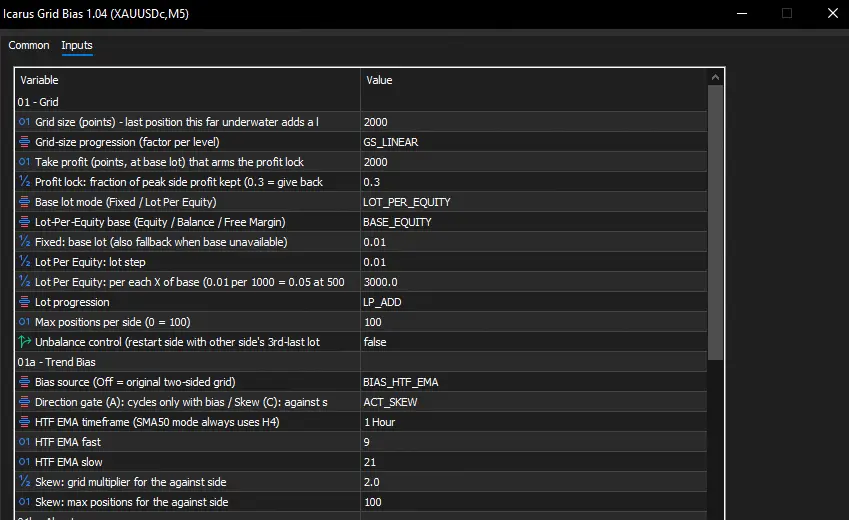
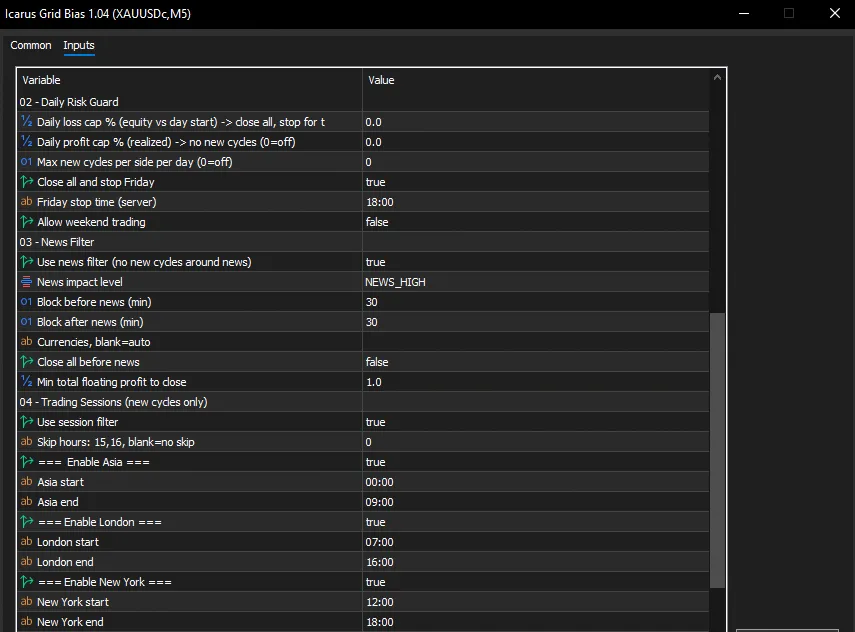
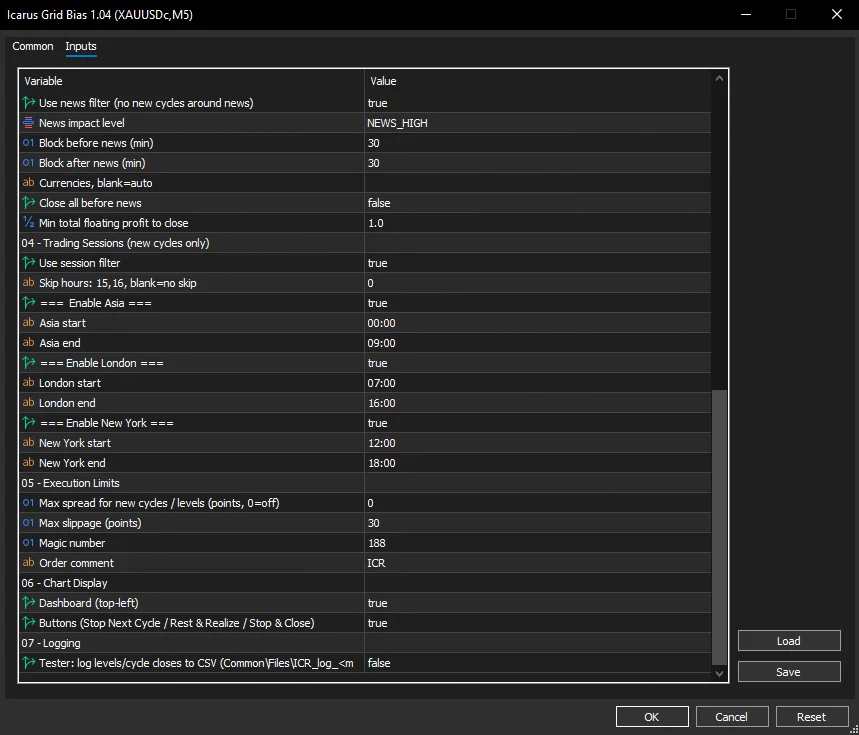
We used these values for the functionality check, not as a recommended profile; we did not record a selection rationale. Grid and spread inputs use points, not a universal price distance. The code converts distance using _Point and tick properties, so 2,000 points can mean different price movement on different symbols. Scale settings to the broker’s quote precision and contract; don’t transfer this XAUUSDc setup to another pair unchanged.
Backtest & Forward-Test Analysis: Reading the Evidence
We ran one Strategy Tester check on an Exness cent account to confirm the EA operated, not to assess profitability. We tested XAUUSDc on an M5 chart with HTF EMA / Skew enabled and H1 fast/slow periods 9/21; this was not the default Bias Off setup. We did not test other pairs. The visible graph axis spans 2026-09-07 to 2026-10-20. Our report lists 100% history quality, but modeling mode, account currency, spread, commission, and swap assumptions are not visible.
Our high-risk .set preset matches the input screenshots, and we plan to include it in the compiled-only release ZIP. It records inputs, not results; Figure 5 is where we read the profit, trade-count, and drawdown figures. To trace which baskets drove those totals, we would need the tester’s deal list.
Our report shows 50.81% relative equity drawdown, versus 16.08% balance drawdown. For an averaging grid, that gap matters: balance alone misses the full open-equity decline. We also saw positive net profit in this one historical run, but the account currency is not shown; that result says nothing about future performance or controlled risk.
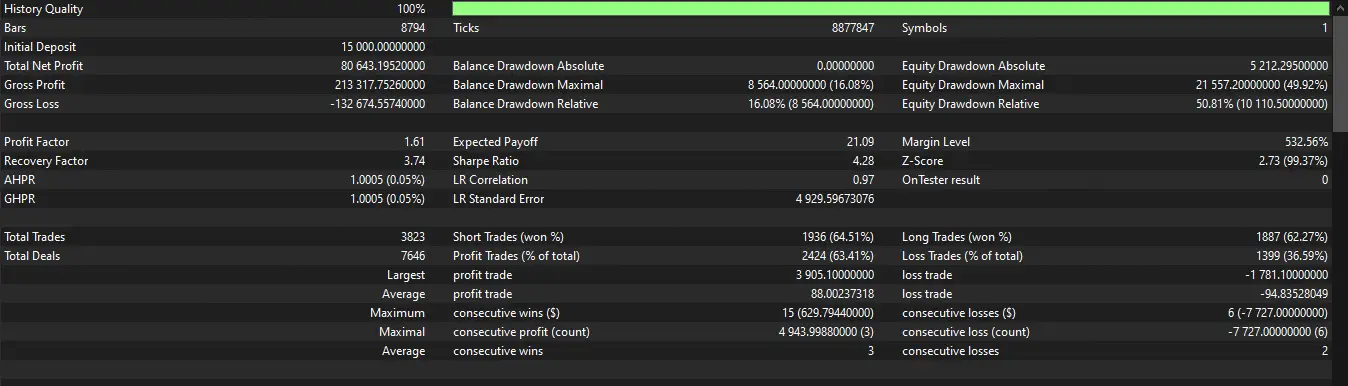
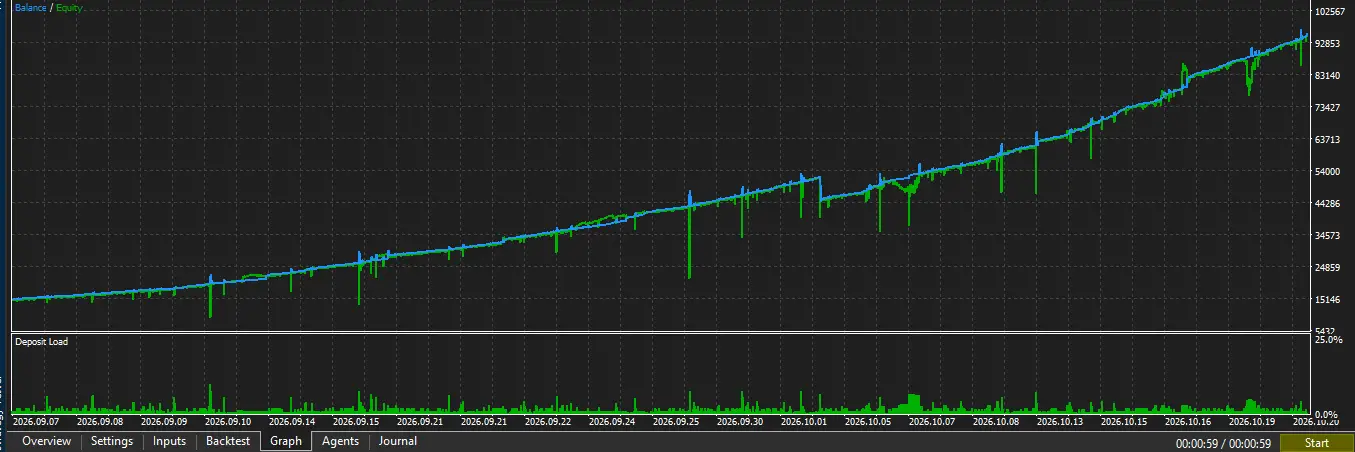
| Metric | Result | Source | What It Tells You |
|---|---|---|---|
| Run scope | XAUUSDc M5 chart; H1 EMA/Skew; cent account per developer; 2026-09-07–2026-10-20 visible graph span | Figures 2–6 and our test note | One chart symbol/period was tested; the optional bias reads H1. No other pairs were tested. |
| History sample | 100% history quality; 8,794 bars; 8,877,847 ticks; 1 symbol | Figure 5 | History quality is reported, but the tick-model selection is not shown. |
| Initial deposit and net profit | 15,000 and 80,643.1952 report units; currency not shown | Figure 5 | Do not convert these values to dollars without the account-currency label. |
| Profit factor and expected payoff | 1.61 and 21.09 report units | Figure 5 | Historical summary only; not a forward expectation. |
| Trades and winning share | 3,823 trades; 2,424 profit trades (63.41%); 7,646 deals | Figure 5 | The report also shows 1,399 losing trades (36.59%). |
| Balance drawdown | Relative 16.08% (8,564); maximal 8,564 (16.08%); absolute 0 | Figure 5 | Balance drawdown is much lower than the reported equity drawdown. |
| Equity drawdown | Relative 50.81% (10,110.50); maximal 21,557.20 (49.92%); absolute 5,212.295 | Figure 5 | The equity decline is the main risk signal in this single run. |
| Gross totals and recovery | Gross profit 213,317.7526; gross loss −132,674.5754; recovery factor 3.74; Sharpe ratio 4.28 | Figure 5 | Values are in report units; they do not resolve the missing cost and model details. |
We have not run a forward test or independently reproduced this report. MetaTrader’s Strategy Tester disables our calendar-news filter even when its input is On, so this run doesn’t validate live news blocking. Treat it as a functionality check; start on demo and don’t infer a trading edge from one run.
Critical Edge Cases and When to Turn It Off
A prolonged one-way move is the main structural stress case. The grid averages into adverse movement, lot progression can add exposure, and the bias options do not install price-level exits. Gate may prevent a new counter-direction cycle; Skew may widen levels, but neither closes a basket already in drawdown.
Session, news, weekend, daily-profit, and cycle-count gates mainly restrict new cycles. An open basket may keep adding levels; the daily-loss routine also has the close-failure limitation described above. Spread is checked for additions only when its cap is enabled, and the test configuration sets that cap to zero.
The order wrapper calls CTrade::PositionOpen with zero Stop Loss and Take Profit, then treats a true return as a successful open. The MQL5 PositionOpen reference says that a true return does not always mean the trade executed and directs developers to check the server return code and deal result. That explicit check is not visible before this EA logs an open.
The dashboard’s next-margin value is informational rather than an order-entry veto. Broker margin rules, cent-account contract specifications, point size, swaps, commissions, rollover spreads, and gaps can all change the path of a basket. Because exits are software-side, they also depend on MetaTrader and the EA being able to run.
How the Port Compares
We don’t compare performance with a named competitor because none was identified. The useful comparison is between this EA’s own modes: Bias Off starts both sides; Gate filters new cycles by direction; Skew keeps the counter-bias side active with different spacing and a separate position limit.
Gate is the simpler mode for restricting new counter-direction cycles, although a neutral reading can block both sides. Skew changes exposure rather than removing it. Traders who require broker-side stops or a firm basket ceiling need a different execution design. Browse the MetaTrader Expert Advisors index and the MT5 tools index for the broader library.
Step-by-Step MetaTrader Installation Guide
-
In MetaTrader 5, open File → Open Data Folder, then
MQL5/Experts/. When supplied, place the compiled.ex5build there. We plan to release this port as a free compiled-only build, with no public.mq5source. -
Refresh the Navigator or restart MetaTrader, then attach the EA to the intended symbol and timeframe.
-
Use a retail hedging account. For HTF EMA bias, choose a bias timeframe above the chart timeframe; the default H1 mode will not initialize on an H1-or-higher chart.
-
Enable Algo Trading and the EA’s live-trading permission. Check the Experts and Journal tabs, broker lot minimums, Magic Number, point size, and server-time settings.
-
Run a demo test before considering live use. The screenshots show one XAUUSDc M5 chart run with H1 EMA bias; the news filter does not operate in Strategy Tester.
Advantages and Disadvantages
Advantages
- Both-sided grid behavior and closed-bar bias controls are integrated.
- Gate and Skew offer distinct ways to alter new cycles and counter-bias additions.
- Per-side profit locking, chart controls, dashboard, and tester CSV logging are included.
- The input screenshots document a specific v1.04 test configuration.
Disadvantages
- No broker-side Stop Loss or Take Profit; persistent adverse movement can accumulate exposure.
- The tester configuration disables daily-loss and spread limits and allows 100 positions per side.
- The single report shows 50.81% relative equity drawdown and does not validate other pairs.
- Close failures, trade-server result handling, modeling mode, and transaction costs remain unresolved.
Source, Licence and Distribution
- Rights
- Freeware
- MT5 port by
- Eko Martha Kusumah (AlgoToolbox)
- Original author
- MaPi
- Original work
- Free Grid EA Ikarus - From zero to hero (Ikarus 2.2)
- Licence
- Freeware (see EULA)
- Version tested
- 1.04
- Tool type
- Expert Advisor
Attribution. Based on Free Grid EA Ikarus - From zero to hero (Ikarus 2.2) by (original publication). MT5 port by Eko Martha Kusumah: rewritten and tested in MQL5, published on AlgoToolbox.
Frequently Asked Questions
Does Icarus Grid Bias MT5 place trades automatically?
Yes. We built it as an Expert Advisor; it sends buy and sell market orders for the chart symbol and manages positions by Magic Number. It isn’t a chart-only indicator. In our v1.04 check, we enabled HTF EMA/Skew; the source default is Bias Off.
Does the chart timeframe matter?
Think of the chart timeframe as the candle size on screen. With InpBiasMode = BIAS_OFF, it is not an entry signal setting for the core grid, and M5 is not required; H1/9/21 values in “01a – Trend Bias” remain dormant. The displayed test is different: it enabled HTF EMA at H1 (9/21) on an M5 chart, so H1 data informed the bias. HTF EMA requires the bias period to be higher than the chart period; the SMA50 option uses H4. It is the selected bias mode—not merely having values filled in—that activates this timeframe logic.
Does it place a broker-side stop loss or take profit?
No. The opening call supplies zero for both price-level fields. The Take Profit input arms a virtual side-profit lock; it is not an order sent to the broker. If the terminal or EA cannot run, those software-side exits are not active.
Were other symbols tested?
No. We tested only XAUUSDc on an M5 chart, with H1 EMA/Skew active. This was one functionality check, not a result for other pairs.
Final Verdict and Actionable Recommendations
We built Icarus Grid Bias MT5 as a hedging-only grid without broker-side SL/TP; our XAUUSDc M5 check shows 50.81% relative equity drawdown.
Our test was narrow: we turned off daily-loss and spread limits and allowed 100 positions per side. We share this for educational purposes only—test on demo first, and use live at your own risk.
⚠️ Risk & Transparency Notice: All indicators, scripts, and backtest results on AlgoToolbox are for educational and testing purposes only. Trading Forex, CFDs, and cryptocurrencies carries significant financial risk. Past performance does not guarantee future results. This article may contain contextual affiliate links to tools or brokers we use. Read our full Risk Disclaimer.